EducationSoftwareStrategy.com
StrategyCommunity

Knowledge Base

Product

Community

Knowledge Base

TopicsBrowse ArticlesDeveloper Zone

Product

Download SoftwareProduct DocumentationSecurity Hub

Education

Tutorial VideosSolution GalleryEducation courses

Community

GuidelinesGrandmastersEvents
x_social-icon_white.svglinkedin_social-icon_white.svg
Strategy logoCommunity

© Strategy Inc. All Rights Reserved.

LegalTerms of UsePrivacy Policy
  1. Home
  2. Topics

KB262056: The markers on the line graph cannot be displayed as selected when running a report services document and using the line graph selector with MicroStrategy Mobile for Android App 10


Community Admin

• Strategy


This Knowledge Base article describes a known issue that markers on the line graph cannot be displayed as selected when running a report services document and using the line graph selector with MicroStrategy Mobile for Android App 10. This issue has been addressed in MicroStrategy Mobile for Android App 10.2. Upgrade to this release to take advantage of the fix.

SYMPTOM: 
The markers on the line graph cannot be displayed as selected when running a report services document and using the line graph selector with Strategy Mobile for Android App 10.
 
STEPS TO REPRODUCE:
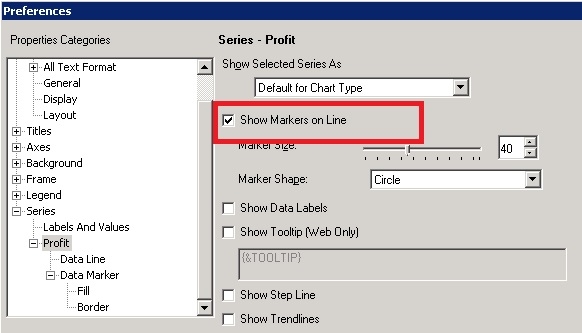
  • In Developer, create a line graph with the attribute Quarter and the metric Profit, right click the graph and open the Preferences editor, check the option "Show Markers on Line", as shown below:
ka04W000000OcBBQA0_0EM4400000029vE.jpeg
  • Create a Report Services document with this graph report, use the attribute Quarter in the graph as a selector to target to another grid.
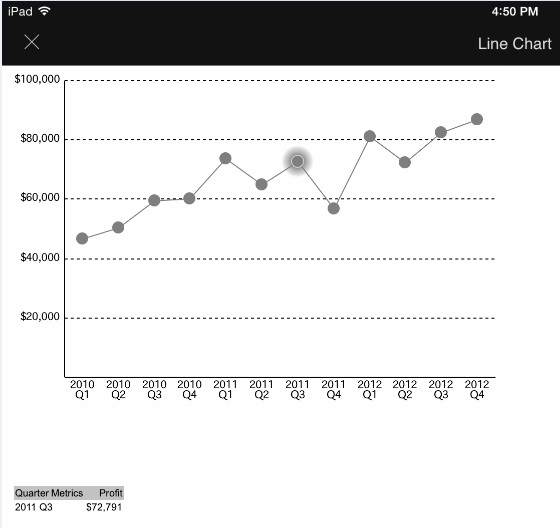
  • Run the document on iPad, select any marker on the line graph, note that it shows as a selection, as shown below:
ka04W000000OcBBQA0_0EM4400000029vH.jpeg
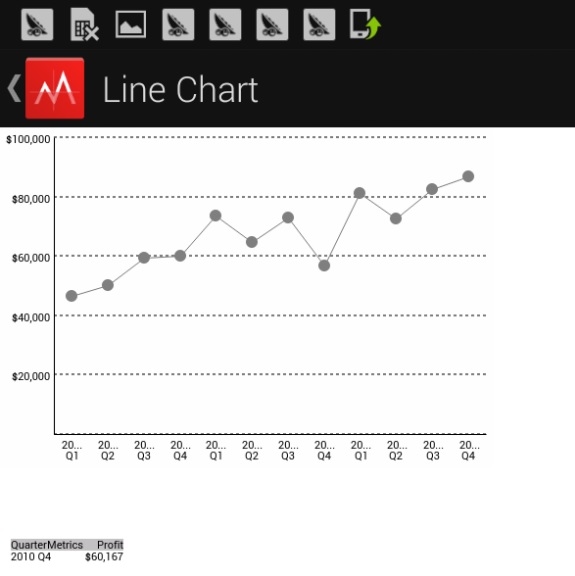
  • Run the document on Android, select any marker, note that it cannot be displayed as a selection, as shown below:
ka04W000000OcBBQA0_0EM4400000029vG.jpeg

CAUSE:
This is a known issue with Strategy Mobile for Android App 10.
 
ACTION:
This issue has been addressed in Strategy Mobile for Android App 10.2. Upgrade to this release to take advantage of the fix.


Comment

0 comments

Details

Knowledge Article

Published:

May 19, 2017

Last Updated:

May 19, 2017