EducationSoftwareStrategy.com
StrategyCommunity

Knowledge Base

Product

Community

Knowledge Base

TopicsBrowse ArticlesDeveloper Zone

Product

Download SoftwareProduct DocumentationSecurity Hub

Education

Tutorial VideosSolution GalleryEducation courses

Community

GuidelinesGrandmastersEvents
x_social-icon_white.svglinkedin_social-icon_white.svg
Strategy logoCommunity

© Strategy Inc. All Rights Reserved.

LegalTerms of UsePrivacy Policy
  1. Home
  2. Topics

KB262383: New Feature in MicroStrategy Mobile for iOS 10.1 - Show "current location" on map widget


Community Admin

• Strategy


This article outlines how to configure the setting to show the current location on MicroStrategy Mobile.

In Strategy Mobile for iOS 10.1, users have the ability to leverage native iOS capability and identify their current location within the map widget. This feature could be useful for showing locations that are within a given distance from your current location. 
 
How to show the current location: 
  • Create a Reort Service document with the Map widget.
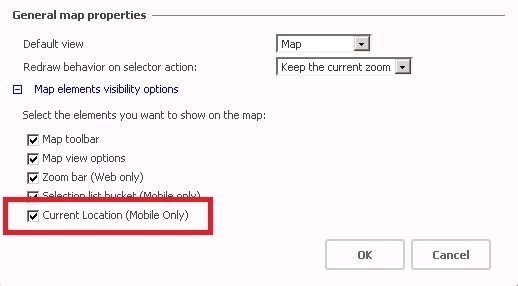
  • Configure the Map widget, check the option "Current Location (Mobile Only)", as shown below:
ka04W000001MKtaQAG_0EM4400000029vQ.jpeg
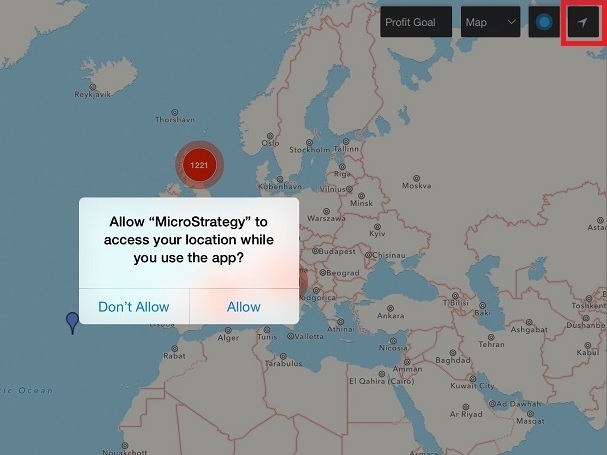
  • Run the document on iPad and click the current location icon. The user will be prompted asking to allow "Strategy" to access your location as shown below:
ka04W000001MKtaQAG_0EM4400000029vD.jpeg
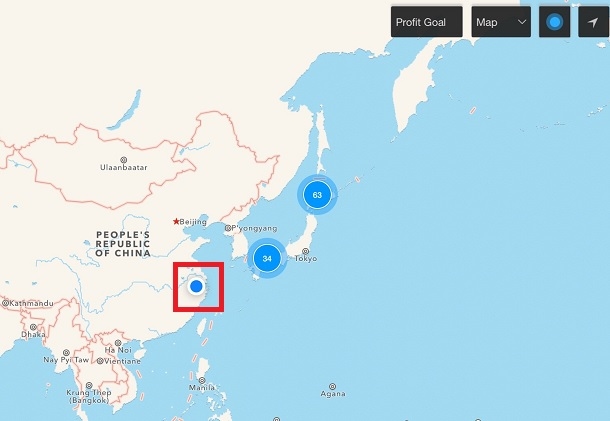
  • Click "Allow" and the current location displays on the map as shown below: 
ka04W000001MKtaQAG_0EM4400000029vC.jpeg

Comment

0 comments

Details

Knowledge Article

Published:

April 4, 2017

Last Updated:

April 4, 2017