EducationSoftwareStrategy.com
StrategyCommunity

Knowledge Base

Product

Community

Knowledge Base

TopicsBrowse ArticlesDeveloper Zone

Product

Download SoftwareProduct DocumentationSecurity Hub

Education

Tutorial VideosSolution GalleryEducation courses

Community

GuidelinesGrandmastersEvents
x_social-icon_white.svglinkedin_social-icon_white.svg
Strategy logoCommunity

© Strategy Inc. All Rights Reserved.

LegalTerms of UsePrivacy Policy
  1. Home
  2. Topics

KB263543: The error "Object BaseAttributeForm has already been deleted or is in an invalid state" is seen when trying to remove the first source table from an attribute form sorted alphabetically in MicroStrategy 10.0-10.3.


Community Admin

• Strategy


This technical note documents a known issue in which the error "Object BaseAttributeForm has already been deleted or is in an invalid state" is seen when trying to remove the first source table from an attribute form sorted alphabetically in MicroStrategy 10.0-10.3. A resolution has been provided.

SUMMARY:
This technical note documents a known issue in which the error "Object BaseAttributeForm has already been deleted or is in an invalid state" is seen when trying to remove the first source table from an attribute form sorted alphabetically in Strategy 10.0-10.3. A resolution has been provided.
SYMPTOM:
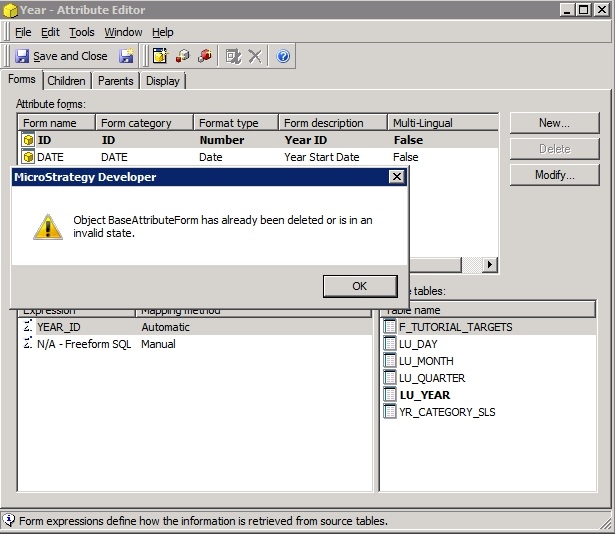
The error "Object BaseAttributeForm has already been deleted or is in an invalid state" is seen when modifying attribute form's source tables in Strategy 10.0-10.3. This is seen when removing the first table sorted alphabetically in the list. Removing other source tables does not cause an error.
ka04W000000Oe1rQAC_0EM440000002C48.jpeg


Object BaseAttributeForm has already been deleted or is in an invalid state.

 
CAUSE:
This is a known issue with Strategy 10.0-10.3.
 
ACTION:
This issue has been addressed in Strategy 10.4. Upgrade to that version to take advantage of this fix.
 
WORKAROUND:
There are a couple of options to workaround this limitation.
Option A
1. Create a new attribute form without the undesired source table.
2. Change the form category to that of the original forms.
3. Delete the original form
Option B
1. Rename the logical table so it will be sorted after others in the source table list.
2. Remove the undesired source table
3. Rename the logical table back to the original name.
 
The Strategy Internal Reference Number for the issue discussed in this technical note is DE17427.


Comment

0 comments

Details

Knowledge Article

Published:

April 4, 2017

Last Updated:

April 4, 2017