EducationSoftwareStrategy.com
StrategyCommunity

Knowledge Base

Product

Community

Knowledge Base

TopicsBrowse ArticlesDeveloper Zone

Product

Download SoftwareProduct DocumentationSecurity Hub

Education

Tutorial VideosSolution GalleryEducation courses

Community

GuidelinesGrandmastersEvents
x_social-icon_white.svglinkedin_social-icon_white.svg
Strategy logoCommunity

© Strategy Inc. All Rights Reserved.

LegalTerms of UsePrivacy Policy
  1. Home
  2. Topics

KB263716: Error “Population Exception: The object shown in the following hierarchy no longer exists in schema: -Schema” shows when updating schema after adding an attribute in a fact extension allocation expression.


Community Admin

• Strategy


Error “Population Exception: The object shown in the following hierarchy no longer exists in schema: -Schema” shows when updating schema after adding an attribute in a fact extension allocation expression.

SUMMARY:
This issue has been classified as a defect by Strategy. The impact is from the Strategy 9.3.1 product when updating schema after adding an attribute in a fact extension allocation expression. A solution/code fix for this issue is not available in current releases but is being reviewed for a future Strategy release.
SYMPTOM:
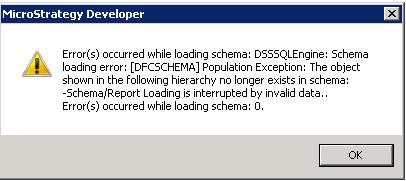
After adding an attribute to the allocation expression in a fact extension, when trying to update the schema, the error “Population Exception: The object shown in the following hierarchy no longer exists in schema: -Schema” shows.
ka04W000000OhmvQAC_0EM440000002C40.jpeg


Error(s) occured while loading schema: DSSSQLEngine: Schema loading error: [DFCSCHEMA] Population Exception: The object shown in the following hierarchy no longer exists in schema: -Schema/Report Loading is interrupted by invalid data.. Error(s) occurred while loading schema: 0.

 
STEPS TO REPRODUCE:

  1. Log in Developer and go to Schema Objects – Facts – Secondary Facts.
  2. Edit the Item-level Units sold fact and go to the ‘Extensions’ tab in order to add a new extension.
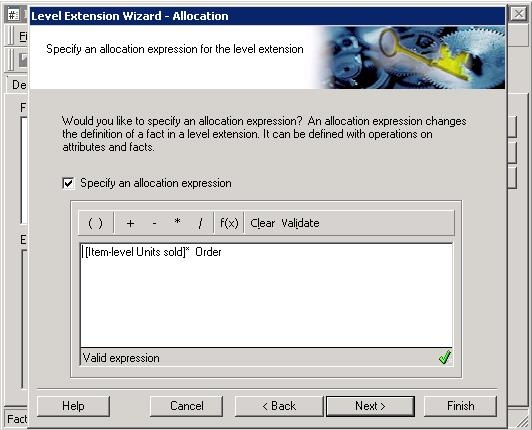
  3. When prompted to ‘Specify an allocation expression’ add the following expression:

[Item-level Units sold] * [Order]

ka04W000000OhmvQAC_0EM440000002C4E.jpeg
  1. Save the fact and try to update the schema in a 3-tier environment.
  2. Notice the error “Population Exception: The object shown in the following hierarchy no longer exists in schema: -Schema” shows.

CAUSE:
This is a known issue in Strategy Developer 9.3.1. The GUI for Developer allows for attributes to be used in the allocation expression even if that is not possible as of right now.
ACTION:
Currently this issue is still being reviewed for feasibility by our Technology team and it is not scoped for any upcoming scheduled Strategy release.
 
The Strategy Internal Reference Number for the issue discussed in this technical note is DE20328.


Comment

0 comments

Details

Knowledge Article

Published:

April 14, 2017

Last Updated:

April 14, 2017