EducationSoftwareStrategy.com
StrategyCommunity

Knowledge Base

Product

Community

Knowledge Base

TopicsBrowse ArticlesDeveloper Zone

Product

Download SoftwareProduct DocumentationSecurity Hub

Education

Tutorial VideosSolution GalleryEducation courses

Community

GuidelinesGrandmastersEvents
x_social-icon_white.svglinkedin_social-icon_white.svg
Strategy logoCommunity

© Strategy Inc. All Rights Reserved.

LegalTerms of UsePrivacy Policy
  1. Home
  2. Topics

KB263828: A white line appears when hovering over grids on a document in Interactive mode in MicroStrategy Web 10


Community Admin

• Strategy


This article details the following: In MicroStrategy Web 10 Interactive mode, a white line appears over the grid cell border when hovering over it.

SYMPTOM:
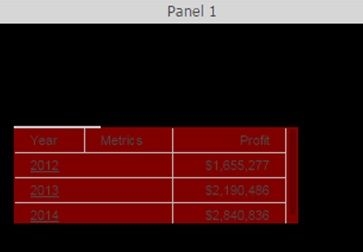
In Strategy Web 10 Interactive mode, a white line appears over the grid cell border when hovering over it, as shown below.
Before hovering.

ka04W000000OeneQAC_0EM4400000025XQ.jpeg

After hovering once.

ka04W000000OeneQAC_0EM4400000025XO.jpeg

After hovering twice.

ka04W000000OeneQAC_0EM4400000025XP.jpeg

 
STEPS TO REPRODUCE:

  1. Create a report with Year and Cost.
  2. Add the report to a document as a grid.
  3. Change the color of the grid and the background to a dark color.
  4. Run the document in Interactive mode.
  5. Hover over the grid.
  6. Notice a white line appears on the top left of the grid.

Note: The line gets longer the more times the mouse hovers on and off of the grid.
 
CAUSE:
This is an identified defect in Strategy Web 10, Interactive mode.
 
ACTION:
Starting in Strategy Web 10.1, Presentation mode is now the default run mode. For more information, refer to tech note KB258357. The issue does not occur in Presentation mode. 
 
Upgrade to Strategy Web 10.1 and use Presentation mode instead.
 
The Strategy Internal Reference Number for the issue discussed in this technical note is DE21477.


Comment

0 comments

Details

Knowledge Article

Published:

June 5, 2017

Last Updated:

June 5, 2017