EducationSoftwareStrategy.com
StrategyCommunity

Knowledge Base

Product

Community

Knowledge Base

TopicsBrowse ArticlesDeveloper Zone

Product

Download SoftwareProduct DocumentationSecurity Hub

Education

Tutorial VideosSolution GalleryEducation courses

Community

GuidelinesGrandmastersEvents
x_social-icon_white.svglinkedin_social-icon_white.svg
Strategy logoCommunity

© Strategy Inc. All Rights Reserved.

LegalTerms of UsePrivacy Policy
  1. Home
  2. Topics

KB263886: The &hiddensections URL API parameter does not hide the top navigation bar in Presentation mode in MicroStrategy Web 10.1.


Alejandro Olvera Velasco

Product Manager, Principal • MicroStrategy


This article describes an issue in which the &hiddensections URL API parameter does not hide the top navigation bar in Presentation mode in MicroStrategy Web 10.1.

Description

Users may want to display Strategy Web 10.1 documents inside an iframe. To prevent users from navigating out of the document, they might want to hide some sections from the page. This is easily done using the &hiddensections URL parameter that can be obtained from the folder browsing page.

  1. Navigate to the document.
  2. Right click the document > Share >  Embed.
  3. Examine the src parameter, which contains the URL to the document.
  4. Extract the &hiddensections parameter:
    
    &hiddensections=header,path,dockTop,dockLeft,footer

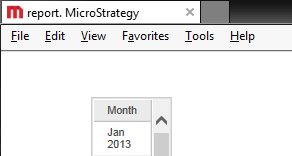
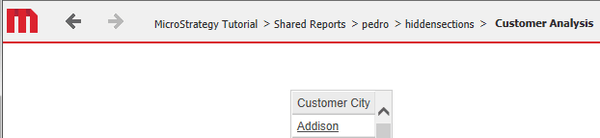
However, this parameter does not seem to hide the relevant sections in the new Strategy Web 10.1 Presentation mode.
In Strategy Web 10.0 Express mode.
ka02R000000g2rBQAQ_0EM4400000025Ya.jpeg

 
In Strategy Web 10.1 Presentation mode.
ka02R000000g2rBQAQ_0EM4400000025Yc.jpeg

 
Notice the Strategy Navigation toolbar is still displayed.
 

Why is this happening?

This is an identified defect in Strategy Web 10.1.

Solution

This defect has been addressed with Strategy Web 10.2. Upgrade to take advantage of the fix.


Comment

0 comments

Details

Knowledge Article

Published:

March 31, 2017

Last Updated:

September 20, 2019