EducationSoftwareStrategy.com
StrategyCommunity

Knowledge Base

Product

Community

Knowledge Base

TopicsBrowse ArticlesDeveloper Zone

Product

Download SoftwareProduct DocumentationSecurity Hub

Education

Tutorial VideosSolution GalleryEducation courses

Community

GuidelinesGrandmastersEvents
x_social-icon_white.svglinkedin_social-icon_white.svg
Strategy logoCommunity

© Strategy Inc. All Rights Reserved.

LegalTerms of UsePrivacy Policy
  1. Home
  2. Topics

KB263893: “Failed to execute query…Error fetching results” when attempting to publish a cube created from Build a Query or Pick Tables database data import from Presto using the Hive Connector in MicroStrategy Web 10.x


Community Admin

• Strategy


SUMMARY:
This article describes a known issue with publishing cubes through database data import using Presto with the Hive connector. This issue is currently being reviewed by Strategy for a potential code fix in an upcoming release.
 
SYMPTOM:
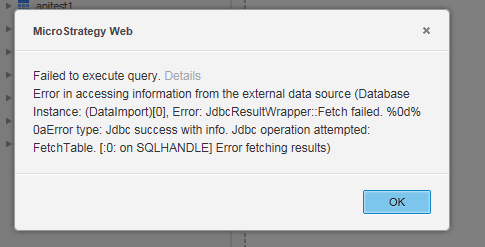
In Strategy Analytics Enterprise 10, users can connect to Presto through JDBC as a data source for data import. Presto is a distributed SQL query engine that queries large data sets distributed from other data sources, such as Hive, MySQL, and PostgreSQL. However, when attempting to publish a cube from a Presto with Hive Connector data source using either Pick Tables or Build a Query, the following error message displays:
 

ka04W000001MKowQAG_0EM4400000025YJ.jpeg


Failed to execute query.
Error in accessing information from the external data source (Database Instance: (DataImport)[0], Error: JdbcResultWrapper::Fetch failed. %0d%0a
Error type: Jdbc success with info. Jdbc operation attempted: FetchTable. [:0: on SQLHANDLE] Error fetching results)

 
Note: This issue does not occur for the option ‘Type a Query’.
 
STEPS TO REPRODUCE: 

  1. Download the Presto JDBC driver (.jar file).
  2. Log into Strategy Web and select 'Add External Data' > Database > Presto.
  3. Connect to a Presto with Hive connector server.
  4. Select Build a Query or Pick Tables.
  5. Select any table from the default schema.
  6. Click 'Finish'.
  7. Notice the error message displays.

 
CAUSE:
This issue is classified as a defect in Strategy Analytics Enterprise 10.x.
 
ACTION: 
The issue has been addressed in Strategy 10.4. 
 
WORKAROUND:
Use the option ‘Type a query’ and write custom SQL to select the data from the tables. Users can also bring tables in from Presto with Hive through Warehouse Catalog in Strategy Developer.


Comment

0 comments

Details

Knowledge Article

Published:

April 6, 2017

Last Updated:

April 6, 2017