EducationSoftwareStrategy.com
StrategyCommunity

Knowledge Base

Product

Community

Knowledge Base

TopicsBrowse ArticlesDeveloper Zone

Product

Download SoftwareProduct DocumentationSecurity Hub

Education

Tutorial VideosSolution GalleryEducation courses

Community

GuidelinesGrandmastersEvents
x_social-icon_white.svglinkedin_social-icon_white.svg
Strategy logoCommunity

© Strategy Inc. All Rights Reserved.

LegalTerms of UsePrivacy Policy
  1. Home
  2. Topics

KB263917: “Incomplete workflow. A workflow must have at least one entry process.” Error message displays when executing a workflow in System Manager 9.x and 10.x


Community Admin

• Strategy


This article describes an issue that occurs when executing a workflow in System Manager that does not have an entry process configured in MicroStrategy 9.x and 10.x

SUMMARY:
This article describes an issue that occurs when executing a workflow in System Manager that does not have an entry process configured in Strategy 9.x and 10.x
SYMPTOM:
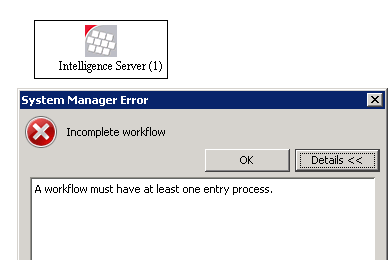
In Strategy System Manager 9.x/10.x, users are able to execute workflows. However, in order to execute a workflow, at least one of the workflow processes need to be configured as an Entry Process. If no Entry Process is configured, the following error message displays:
ka04W000000OguyQAC_0EM440000002HET.jpeg


Incomplete workflow
A workflow must have at least one entry process.

CAUSE:
This is working as designed. In order to execute workflows in System Manager, at least one workflow process needs to be set as an Entry Process in order to kick off the workflow.  
ACTION:
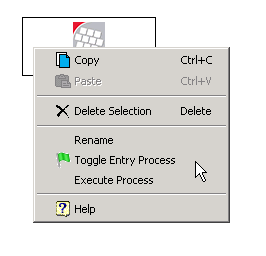
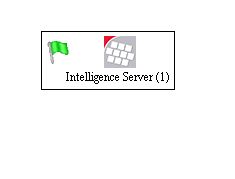
Toggle at least one of the workflow processes to be an Entry Process. An Entry Process is denoted by a green flag. To do this, right-click a workflow and select Toggle Entry Process:
 

ka04W000000OguyQAC_0EM440000002HEa.jpeg

Now a green flag will display for the workflow with no error message, as shown below:
ka04W000000OguyQAC_0EM440000002HES.jpeg

Comment

0 comments

Details

Knowledge Article

Published:

June 8, 2017

Last Updated:

June 8, 2017