EducationSoftwareStrategy.com
StrategyCommunity

Knowledge Base

Product

Community

Knowledge Base

TopicsBrowse ArticlesDeveloper Zone

Product

Download SoftwareProduct DocumentationSecurity Hub

Education

Tutorial VideosSolution GalleryEducation courses

Community

GuidelinesGrandmastersEvents
x_social-icon_white.svglinkedin_social-icon_white.svg
Strategy logoCommunity

© Strategy Inc. All Rights Reserved.

LegalTerms of UsePrivacy Policy
  1. Home
  2. Topics

KB263935: Searching an attribute element in a prompt no elements are returned in MicroStrategy Web


Community Admin

• Strategy


SYMPTOM:
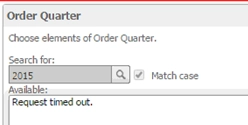
In Strategy Web, users are not able to search for attribute elements in a prompt. When the search button is clicked, no elements are returned and eventually the request will time out, as shown below.
ka04W000000OftLQAS_0EM4400000025RY.jpeg

 
CAUSE:
When using Strategy Web 10.1 through a portal server, an out of the box plugin can be used to enable portlet to portlet functionality.
When this plugin is used, the following can occur: Due to the same-origin policy applied in most browsers, the browser will block a frame from loading when the origin does not match the document.domain that was set to in the request. Chrome Developer tools will show an error similar to below:

ka04W000000OftLQAS_0EM4400000025RW.jpeg


Uncaught SecurityError: Blocked a frame with origin xxx from accessing a frame with origin yyy. The frame being accessed set "document.domain" to zzz, but the frame requesting access did not. Both must set "document.domain" to the same value to allow access.

This issue is caused by the portlet to portlet plugin.
 
ACTION:
If not using Strategy Web  through a portlet, remove the portlet to portlet plugin from the plugins folder. Restart the Strategy Web application server for the changes to take effect.


Comment

0 comments

Details

Knowledge Article

Published:

June 13, 2017

Last Updated:

August 26, 2022