EducationSoftwareStrategy.com
StrategyCommunity

Knowledge Base

Product

Community

Knowledge Base

TopicsBrowse ArticlesDeveloper Zone

Product

Download SoftwareProduct DocumentationSecurity Hub

Education

Tutorial VideosSolution GalleryEducation courses

Community

GuidelinesGrandmastersEvents
x_social-icon_white.svglinkedin_social-icon_white.svg
Strategy logoCommunity

© Strategy Inc. All Rights Reserved.

LegalTerms of UsePrivacy Policy
  1. Home
  2. Topics

KB265717: Error "Failed to parse the JSON content" appears when attempting to access the Data Wrangle feature in MicroStrategy Web 10.1


Community Admin

• Strategy


SYMPTOM
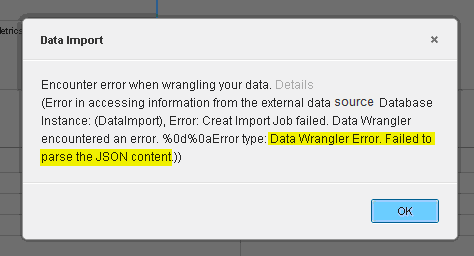
When importing data from an external data source, users attempt to wrangle data using the Data Wrangle feature in Strategy Web 10.1 and encounter the following error message:
ka04W000000Oh76QAC_0EM4400000025Z1.jpeg


Data Import
Encounter error when wrangling your data. Details
(Error in accessing information from the external data source. (Database 
Instance: (DataImport), Error: Create Import Job failed. Data Wrangler
encountered an error: %0d%0aError type: Data Wrangler Error. Failed to
parse the JSON content.))

After clicking 'Ok', the Data Wrangle editor never completes loading.
 
CAUSE
This is a known issue in Strategy Web 10.1.
 
ACTION
This issue is resolved in Strategy Web 10.2.
 
WORKAROUND
The following steps have been shown to address this issue in certain situations:

  1. Navigate to the web.xml file located in C:\Program Files (x86)\Strategy\Intelligence Server\openrefine\webapp\WEB-INF
  2. Delete the following line:
    
    <!DOCTYPE web-app 
        PUBLIC "-//Sun Microsystems, Inc.//DTD Web Application 2.2//EN" 
        "http://java.sun.com/j2ee/dtds/web-app_2_2.dtd"> 

  3. Restart the Intelligence Server.

Comment

0 comments

Details

Knowledge Article

Published:

May 22, 2017

Last Updated:

June 1, 2017