EducationSoftwareStrategy.com
StrategyCommunity

Knowledge Base

Product

Community

Knowledge Base

TopicsBrowse ArticlesDeveloper Zone

Product

Download SoftwareProduct DocumentationSecurity Hub

Education

Tutorial VideosSolution GalleryEducation courses

Community

GuidelinesGrandmastersEvents
x_social-icon_white.svglinkedin_social-icon_white.svg
Strategy logoCommunity

© Strategy Inc. All Rights Reserved.

LegalTerms of UsePrivacy Policy
  1. Home
  2. Topics

KB267339: The Expand Page-by prompt fails to appear when exporting a document with a Group by from Presentation Mode in MicroStrategy Web 10.1 and 10.3


Community Admin

• Strategy


When exporting a document that has an attribute in the Group-by field, an Export Options prompt should appear. However, in MicroStrategy Web 10.1, this prompt does not appear. The document will export the currently selected Group-by page

SYMPTOM:
When exporting a document that has an attribute in the Group-by field, an Export Options prompt should appear, as shown below:

ka04W000000OhenQAC_0EM4400000025WX.jpeg

However, in Strategy Web 10.1, this prompt does not appear. The document will export the currently selected Group-by page.
 
STEPS TO REPRODUCE
Follow these steps in a Strategy Tutorial project.
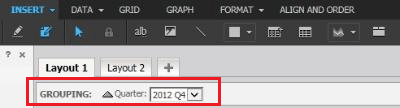
  • Create a document with one attribute and one metric.
  • Add the attribute to the Grouping section, as shown below.
ka04W000000OhenQAC_0EM4400000025Wd.jpeg
  • Run the document in presentation mode.
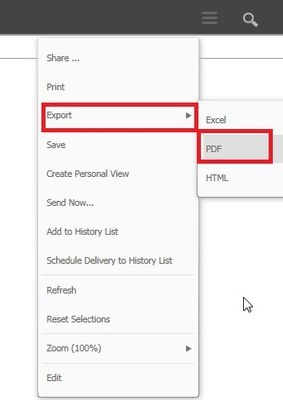
  • Export to PDF or Excel.
ka04W000000OhenQAC_0EM4400000025WV.jpeg
  • Notice that the Export Options prompt never appears. Only the current group by page is exported.

 
CAUSE:
This is an identified defect in Strategy Web 10.1 as well as Strategy 10.3 and later versions.
 
ACTION:
This issue has been addressed in Strategy Web 10.2. 10.4 HF2 and 10.6
WORKAROUND:
Select Print, as shown below, for the prompt to appear. Once the user clicks OK, the document will export to a PDF.
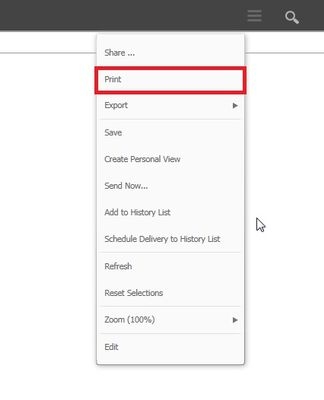
 

ka04W000000OhenQAC_0EM4400000025Wb.jpeg

The Strategy Internal Reference Number for the issue discussed in this technical note is DE20154.


Comment

0 comments

Details

Knowledge Article

Published:

May 1, 2017

Last Updated:

May 1, 2017