C3 is a wrapper library of D3 and makes it easier to generate D3-based charts.
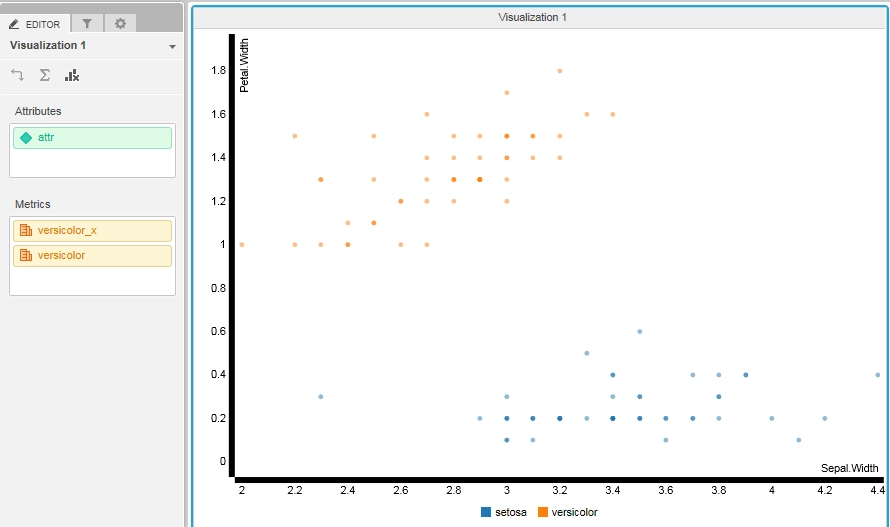
The following sample code demonstrates how to show a Scatter Plot using C3.js library in Visual Insight Dashboard in Strategy Web 10.x. The code is written based off of the sample code at http://c3js.org/samples/chart_scatter.html.
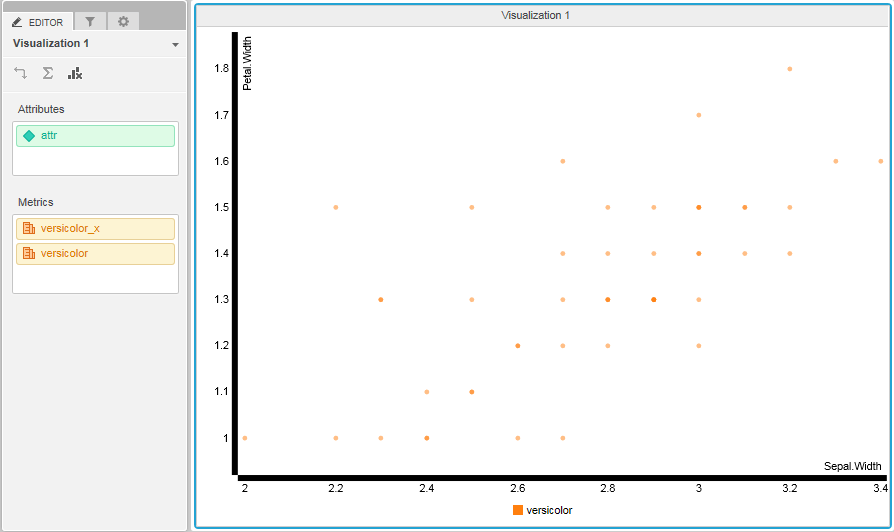
Unloading the preset data of ‘setosa’ after 2 seconds, the chart redraw the grid data of ‘versicolor’ as shown in the image below:
The code of this visualization:
/**
 * Import C3 visualization at http://c3js.org/samples/chart_scatter.html
 */
(function () {
    // Define this code as a plugin in the mstrmojo object
    if (!mstrmojo.plugins.C3chart_scatter) {
        mstrmojo.plugins.C3chart_scatter = {};
    }
    // All mojo visualization require the CustomVisBase library to render
    mstrmojo.requiresCls("mstrmojo.CustomVisBase",
                         "mstrmojo.models.template.DataInterface"
                        );
    // Declare the visualization object
    mstrmojo.plugins.C3chart_scatter.C3chart_scatter = mstrmojo.declare(
        // Declare that this code extends CustomVisBase
        mstrmojo.CustomVisBase,
        null,
        {
            // Define the JavaScript class that renders your visualization as mstrmojo.plugins.{plugin name}.{js file name}
            scriptClass: 'mstrmojo.plugins.C3chart_scatter.C3chart_scatter',
            externalLibraries: [{url: "http://d3js.org/d3.v3.min.js"},{url: "https://cdnjs.cloudflare.com/ajax/libs/c3/0.4.10/c3.min.js"}],
            plot: function () {
 	            console.log("C3chart_scatter:starting...");

                var domNode = this.domNode;

                // data from dataset
                var gridData = new mstrmojo.models.template.DataInterface(this.model.data);
                var metric_1 = gridData.getColHeaders(0).getHeader(0).getName();
                var metric_2 = gridData.getColHeaders(0).getHeader(1).getName();
                var arrayX = [metric_1];
                var arrayY = [metric_2];
                var n = gridData.getTotalRows();

                for(i=1; i <= n; i++){
                    arrayX[i] = gridData.getMetricValue(i-1,0).getValue();
                }

                for(i=1; i <= n; i++){
                    arrayY[i] = gridData.getMetricValue(i-1,1).getValue();
                }

                var chart = c3.generate({
                    bindto: domNode,
                    data: {
                        xs: {
                            'setosa': 'setosa_x',
                            //TODO
                            versicolor : metric_1,
                        },
                        // iris data from R
                        columns: [
                            ["setosa_x", 3.5, 3.0, 3.2, 3.1, 3.6, 3.9, 3.4, 3.4, 2.9, 3.1, 3.7, 3.4, 3.0, 3.0, 4.0, 4.4, 3.9, 3.5, 3.8, 3.8, 3.4, 3.7, 3.6, 3.3, 3.4, 3.0, 3.4, 3.5, 3.4, 3.2, 3.1, 3.4, 4.1, 4.2, 3.1, 3.2, 3.5, 3.6, 3.0, 3.4, 3.5, 2.3, 3.2, 3.5, 3.8, 3.0, 3.8, 3.2, 3.7, 3.3],
                            arrayX,
                            ["setosa", 0.2, 0.2, 0.2, 0.2, 0.2, 0.4, 0.3, 0.2, 0.2, 0.1, 0.2, 0.2, 0.1, 0.1, 0.2, 0.4, 0.4, 0.3, 0.3, 0.3, 0.2, 0.4, 0.2, 0.5, 0.2, 0.2, 0.4, 0.2, 0.2, 0.2, 0.2, 0.4, 0.1, 0.2, 0.2, 0.2, 0.2, 0.1, 0.2, 0.2, 0.3, 0.3, 0.2, 0.6, 0.4, 0.3, 0.2, 0.2, 0.2, 0.2],
                            arrayY,
                        ],
                        type: 'scatter'
                    },
                    axis: {
                        x: {
                            label: 'Sepal.Width',
                            tick: {
                                fit: false
                            }
                        },
                        y: {
                            label: 'Petal.Width'
                        }
                    }
                });


                setTimeout(function () {
                    chart.unload({
                        ids: 'setosa'
                    });
                }, 2000);


            }
        });
})();
