SUMMARY:
This document shows a known issue in which hyperlink does not work in Microcharts with only one row of data in Strategy Mobile 10.1 Hotfix 1. Please contact Strategy Technical Support for the latest update on this issue. Moving the attribute with hyperlink to the left-most would be a workaround.
SYMPTOM:
Hyperlink does not work in Microcharts with only one row of data in Strategy Mobile 10.1 Hotfix 1.
STEPS TO REPRODUCE:
1. Create one report with Category, Subcategory, Year and Cost in Strategy Tutorial project.
2. Create one document with this report as dataset. Add one grid and one Subcategory selector which targets on this grid.
3. Insert attribute Subcategory, Category, Year and Cost into the grid and ensure Category is put in the second on the left as below:

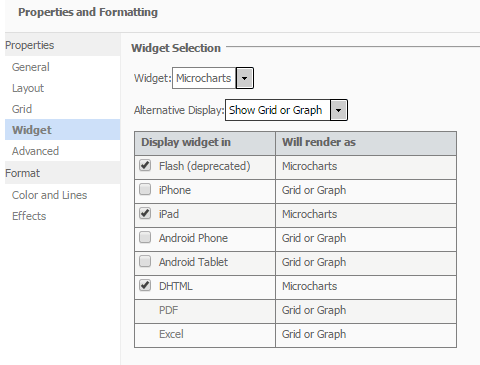
4. In Properties and Formatting of this grid, select Microcharts widget as shown below:
4. Right click on the second attribute Category and click on Edit links to add one hyperlink which links to another document.
5. Run the document in mobile. Select "Art & Architect". There will be only one row in the grid and click on Books but without seeing target document pop up as shown below:
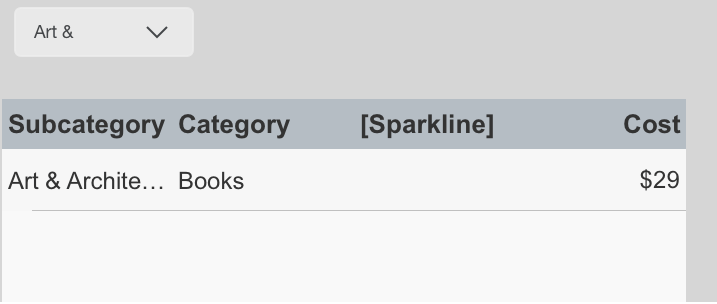
But, hyperlink works when there are two rows in Microcharts when selection is changed.
CAUSE:
This is a known issue in Strategy Mobile 10.1 Hotfix 1.
ACTION:
This is fixed in Strategy Mobile 10.3 application. Upgrade to this release to take advantage of the fix.
WORKAROUND:
Move Category to the left-most position in the grid and then the hyperlink should work.
