EducationSoftwareStrategy.com
StrategyCommunity

Knowledge Base

Product

Community

Knowledge Base

TopicsBrowse ArticlesDeveloper Zone

Product

Download SoftwareProduct DocumentationSecurity Hub

Education

Tutorial VideosSolution GalleryEducation courses

Community

GuidelinesGrandmastersEvents
x_social-icon_white.svglinkedin_social-icon_white.svg
Strategy logoCommunity

© Strategy Inc. All Rights Reserved.

LegalTerms of UsePrivacy Policy
  1. Home
  2. Topics

KB270442: An error “Failed to get SAP logon ticket” appears when trying to connect to SAP BW sources in MicroStrategy 9.x and 10.x


Community Admin

• Strategy


An error “Failed to get SAP logon ticket” appears when trying to connect to SAP BW sources in MicroStrategy 9.x and 10.x

SYMPTOM:
When launching the MDX Cube Catalog to connect to an instance for SAP BW, the following error message appears.


[Database Classes][Error] Connect failed. Login failed.


Error type: JCO layer error. JCOConnection.connect failed. java.lang.Exception: [JCO] Failed to get SAP logon ticket


com.sap.conn.jco.JCoException: (102) JCO_ERROR_COMMUNICATION: Initialization of repository destination DestName failed: Connect from SAP gateway to RFC server failed


Connection parameters: TYPE=A DEST=DestName ASHOST=xx.xx.xx.xx SYSNR=02 PCS=1


LOCATION    SAP-Gateway on host xxxxxxx.yyyy.local / 3302


ERROR       internal error


TIME        Thu Oct 08 13:35:29 2015


RELEASE     701


COMPONENT   NI (network interface)


VERSION     38


RC          -1


MODULE      ninti.c


LINE        742


DETAIL      NiPGetHostByAddr3: '???' not found


SYSTEM CALL getnameinfo


ERRNO       10022


ERRNO TEXT  WSAEINVAL: Invalid argument


COUNTER     3


              at com.Strategy.Database.JCO.JCOConnection3.createConnection(Unknown Source)


              at com.Strategy.Database.JCO.JCOConnection3.connect(Unknown Source)


              at com.Strategy.Database.JCO.JCOConnection.connect(Unknown Source)


. Connection String: APPSERVER=xx.xx.xx.xx;SYSNR=02;CLIENT=350;LANG=EN;JCO;UID=UserName;. Connection String: APPSERVER=xx.xx.xx.xx;SYSNR=02;CLIENT=350;LANG=EN;JCO;UID=UserName;.
 
CAUSE:
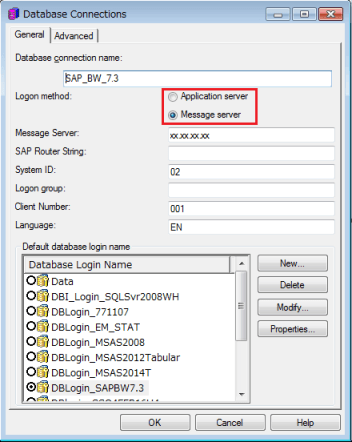
One possible cause for this issue is that a user is trying to connect to the SAP Message Server but fail to specify it in the database instance.
 
ACTION:
By default, the Logon method is set to “Application server”. Hence, if users wish to connect to the Message Server, they should choose the “Message server” in the Logon method field:

ka04W000000Oh6NQAS_0EM4400000029Cz.jpeg

Comment

0 comments

Details

Knowledge Article

Published:

June 4, 2017

Last Updated:

June 4, 2017