EducationSoftwareStrategy.com
StrategyCommunity

Knowledge Base

Product

Community

Knowledge Base

TopicsBrowse ArticlesDeveloper Zone

Product

Download SoftwareProduct DocumentationSecurity Hub

Education

Tutorial VideosSolution GalleryEducation courses

Community

GuidelinesGrandmastersEvents
x_social-icon_white.svglinkedin_social-icon_white.svg
Strategy logoCommunity

© Strategy Inc. All Rights Reserved.

LegalTerms of UsePrivacy Policy
  1. Home
  2. Topics

KB272088: Parameter &hiddensections appended to the URL API doesn’t work in MicroStrategy Web 10.1 Hotfix 1


Community Admin

• Strategy


Parameter &hiddensections doesn’t work in MicroStrategy Web 10.1 Hotfix 1. The path section is still visible when running report services documents using URL API with &hiddensections appended.

SYMPTOM:
Parameter &hiddensections doesn’t work in Strategy Web 10.1 Hotfix 1. The path section is still visible when running report services documents using URL API with &hiddensections appended.

ka04W000000OdfMQAS_0EM4400000025Xw.jpeg

STEPS TO REPRODUCE:
 

  1. Execute a report services document using URL API with the parameter &hiddensections appended. Sample URL:
    http://10.27.73.125/MicroStrategy/asp/Main.aspx?evt=2048001&src=Main.aspx.2048001&visMode=0¤tViewMedia=1&documentID=AA5E85D744BF32F1B625899107328334&server=10.27.73.125&Project=MicroStrategy%20Tutorial&port=0&share=1&hiddensections=dockTop
     
  2. The URL API is supposed to hide the path section of report services documents. However it doesn’t work in Strategy Web 10.1 Hotfix 1.
     

CAUSE:
 
This is a known issue of Strategy Web 10.1 Hotfix 1.
 
ACTION:
This issue has been fixed in Strategy Web 10.2. Take advantage of upgrading for a fix.
 
WORKAROUND
 
Users can follow the steps below to hide the path section in Presentation mode:
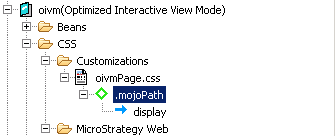
  • Open WCE and navigate to Application Settings > Strategy Web Configuration > Pages > oivm > CSS > Customizations > oivmPage.css.
     
  • Right-click on the css page and create a new selector:
    .mojoPath

ka04W000000OdfMQAS_0EM4400000025Xx.jpeg
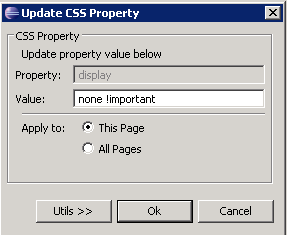
  • Add property "display" for the selector and set the value: none !important

ka04W000000OdfMQAS_0EM4400000025Y2.jpeg
  • Restart your web server and clear web browser cache.

Comment

0 comments

Details

Knowledge Article

Published:

April 7, 2017

Last Updated:

April 7, 2017