EducationSoftwareStrategy.com
StrategyCommunity

Knowledge Base

Product

Community

Knowledge Base

TopicsBrowse ArticlesDeveloper Zone

Product

Download SoftwareProduct DocumentationSecurity Hub

Education

Tutorial VideosSolution GalleryEducation courses

Community

GuidelinesGrandmastersEvents
x_social-icon_white.svglinkedin_social-icon_white.svg
Strategy logoCommunity

© Strategy Inc. All Rights Reserved.

LegalTerms of UsePrivacy Policy
  1. Home
  2. Topics

KB272094: Date filter in Visual Insight displays elements in a reversed order in MicroStrategy Web 9.4.x and 10.x.


Community Admin

• Strategy


Date filter in Visual Insight displays elements in a reversed order in MicroStrategy Web 9.4.x and 10.x.

SYMPTOM:
Date filter in Visual Insight displays elements in a reversed order in Strategy Web 9.4.x and 10.x.
 
STEPS TO REPRODUCE:
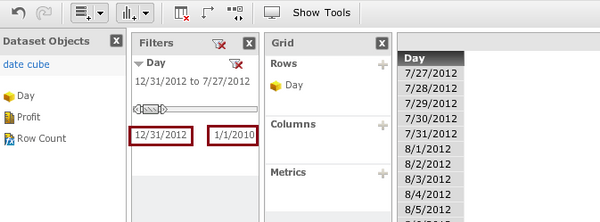
  • Create a date format attribte “Day” and set “Browse sort” to “Descending”.
  • Creat a report with the “Day” attribute and convert it to Visual Insight.
  • Drag the “Day” attribute to the Filter section and the date filter shows elements in a reversed order.

ka04W000000OeMgQAK_0EM4400000025Y4.jpeg

CAUSE:
This is working as designed when Browse sort is set to Descending for the “Day” attribute.
 
ACTION:
Change “Browse sort” to “None” for the attribute and update schema after doing the modification.
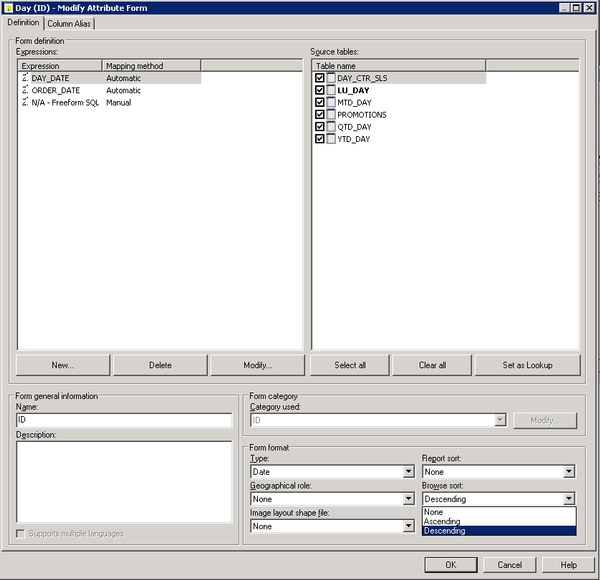
ka04W000000OeMgQAK_0EM4400000025Y9.jpeg


Comment

0 comments

Details

Knowledge Article

Published:

June 12, 2017

Last Updated:

June 12, 2017