EducationSoftwareStrategy.com
StrategyCommunity

Knowledge Base

Product

Community

Knowledge Base

TopicsBrowse ArticlesDeveloper Zone

Product

Download SoftwareProduct DocumentationSecurity Hub

Education

Tutorial VideosSolution GalleryEducation courses

Community

GuidelinesGrandmastersEvents
x_social-icon_white.svglinkedin_social-icon_white.svg
Strategy logoCommunity

© Strategy Inc. All Rights Reserved.

LegalTerms of UsePrivacy Policy
  1. Home
  2. Topics

KB272099: “Rows per page” configured in grid properties doesn’t work for Presentation mode in MicroStrategy Web 10.x


Community Admin

• Strategy


“Rows per page” configured in grid properties doesn’t work for Presentation mode in MicroStrategy Web 10.x, although the same works for Editable mode.

SYMPTOM:
“Rows per page” configured in grid properties doesn’t work for Presentation mode in Strategy Web 10.x, although the same works for Editable mode.
 
STEPS TO REPRODUCE:
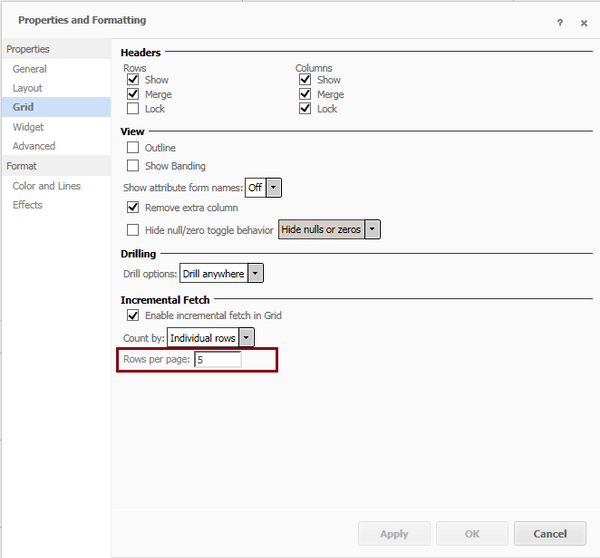
  • Insert a grid to a report service document and enable “Rows per page” for the grid.

ka04W000000OgXzQAK_0EM4400000025Y6.jpeg
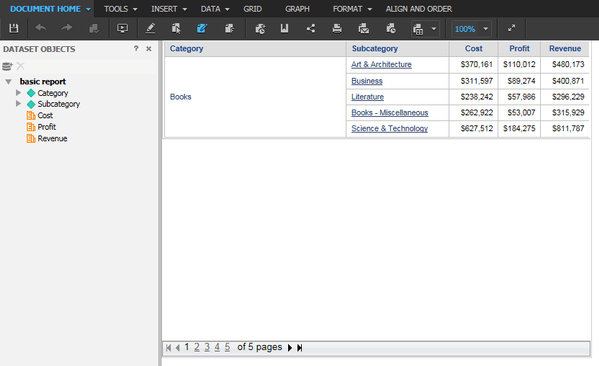
  • Run the report services document in Editable mode. The grid is divided to pages as expected.

ka04W000000OgXzQAK_0EM4400000025YH.jpeg
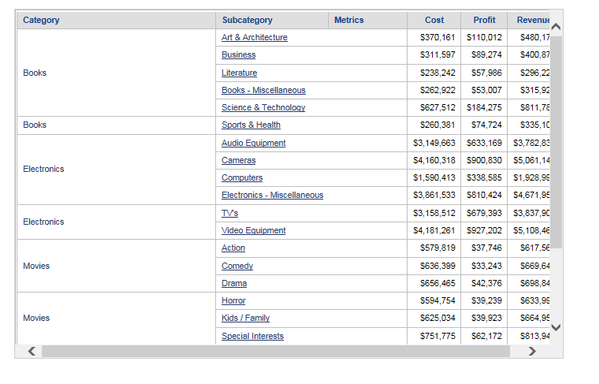
  • Run the report services document in Presentation mode. The function doesn't work and all the grid data are displayed in the same page.

ka04W000000OgXzQAK_0EM4400000025YF.jpeg

CAUSE:
This is working as designed, in presentation mode, there is no page mode for grid


Comment

0 comments

Details

Knowledge Article

Published:

June 9, 2017

Last Updated:

June 14, 2017