EducationSoftwareStrategy.com
StrategyCommunity

Knowledge Base

Product

Community

Knowledge Base

TopicsBrowse ArticlesDeveloper Zone

Product

Download SoftwareProduct DocumentationSecurity Hub

Education

Tutorial VideosSolution GalleryEducation courses

Community

GuidelinesGrandmastersEvents
x_social-icon_white.svglinkedin_social-icon_white.svg
Strategy logoCommunity

© Strategy Inc. All Rights Reserved.

LegalTerms of UsePrivacy Policy
  1. Home
  2. Topics

KB272432: The Link property for Intelligence cubes to create Visual Insight dashboards is missing in MicroStrategy Web 10.


Community Admin

• Strategy


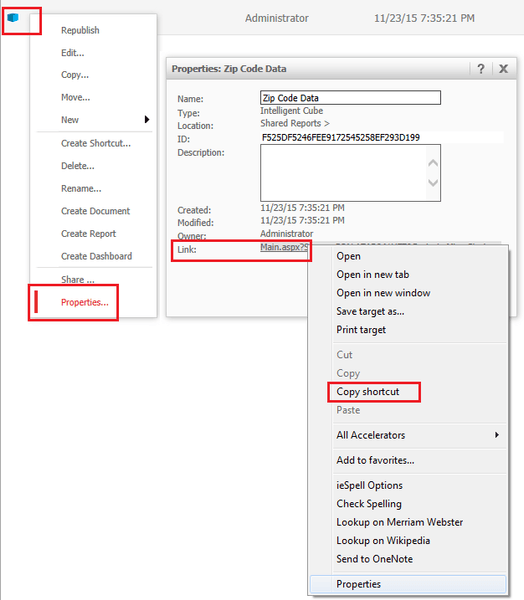
In MicroStrategy Web 9.4.1, users could right click an Intelligence cube to create a URL API call that would allow users to automatically create a Visual Insight dashboard using that same cube. However, in MicroStrategy Web 10, this 'Link' property is no longer available for Intelligence cubes

SYMPTOM:
In Strategy Web 9.4.1, users could right click an Intelligence cube to create a URL API call that would allow users to automatically create a Visual Insight dashboard using that same cube, as shown below:
ka04W000000Ofv7QAC_0EM4400000025W1.jpeg

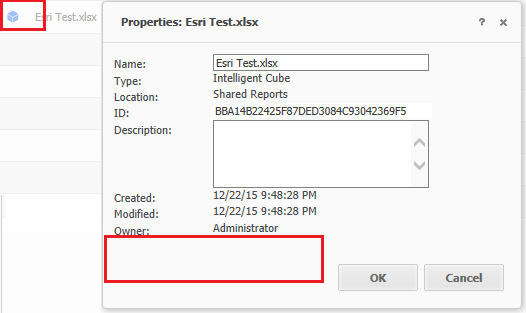
However, in Strategy Web 10, this 'Link' property is no longer available for Intelligence cubes, as seen below:
ka04W000000Ofv7QAC_0EM4400000025Vz.jpeg

 
CAUSE:
This is an identified defect in Strategy Web 10.
WORKAROUND:
Use the following URL to achieve the same functionality in Strategy Web 10:
For Strategy Web ASP


http://<web server name>/MicroStrategy/asp/Main.aspx?Server={&ServerName}&Project={&Project}&Port=0&src=Main.aspx.3104

For Strategy Web JSP

http://<web server name>:port/MicroStrategy/servlet/mstrWeb?Server={&ServerName}&Project={&Project}&src=mstrWeb.3104

The following are the parameters required:

&evt=3104 
&executionMode=1 
&rwDesignMode=0 
&objectType=3 
&rwCreateFlags=16 
&rwViewMode=2048
&objectID= 
Specify the objectID  in the above parameter with the object ID of the Intelligence cube. This can be obtained by right clicking the cube > Properties > ID.
 
In version 10.4 the event code has been changed to 3185 instead of 3104
Note: This URL assumes that a session is already established and that the user has the necessary privileges to create a Visual Insight dashboard.
 
For more infomation on URL API in general, click here .
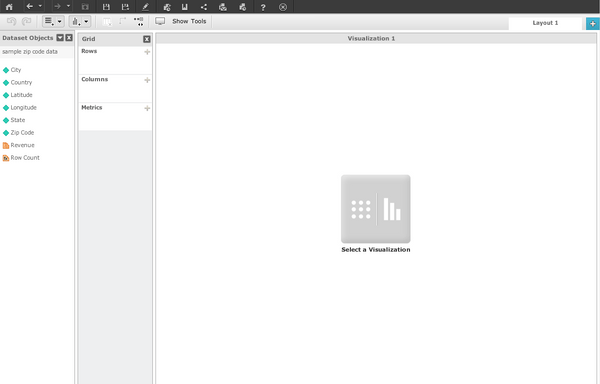
Note: Using the above URL will initially create the VI dashboard using the flash-based interface, as shown below:

ka04W000000Ofv7QAC_0EM4400000025Vv.jpeg

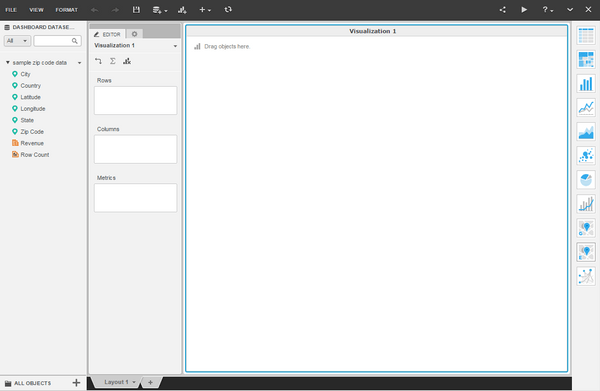
However, save the dashboard, close it, and rerun it from the folder browsing page and It will open up in HTML 5, as shown below:
ka04W000000Ofv7QAC_0EM4400000025W0.jpeg

  
The Strategy Internal Reference Number for the issue discussed in this technical note is DE24152.


Comment

0 comments

Details

Knowledge Article

Published:

April 26, 2017

Last Updated:

April 26, 2017