EducationSoftwareStrategy.com
StrategyCommunity

Knowledge Base

Product

Community

Knowledge Base

TopicsBrowse ArticlesDeveloper Zone

Product

Download SoftwareProduct DocumentationSecurity Hub

Education

Tutorial VideosSolution GalleryEducation courses

Community

GuidelinesGrandmastersEvents
x_social-icon_white.svglinkedin_social-icon_white.svg
Strategy logoCommunity

© Strategy Inc. All Rights Reserved.

LegalTerms of UsePrivacy Policy
  1. Home
  2. Topics

KB273008: Information Window triggered by grid attribute doesn't work on mobile if the panel stack is not targeted in MicroStrategy 10.1


Community Admin

• Strategy


This document discusses about t a known issue that information window triggered by grid attribute doesn't work on mobile if the panel stack is not targeted.

STEPS TO REPRODUCE:
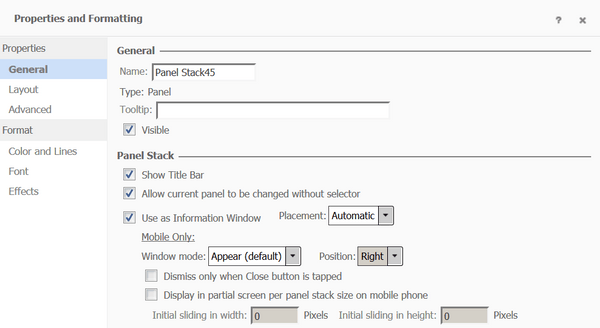
1. Create a Panel Stack and turn it into Info Window.
ka04W000000OfRvQAK_0EM4400000029ui.jpeg

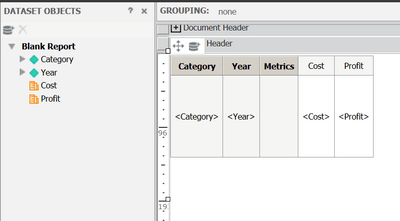
2. Create grid with attributes on it.
ka04W000000OfRvQAK_0EM4400000029uY.jpeg

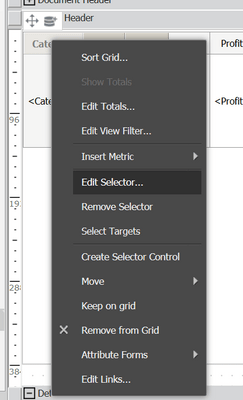
3. Edit Selector on the given attribute.
ka04W000000OfRvQAK_0EM4400000029uk.jpeg

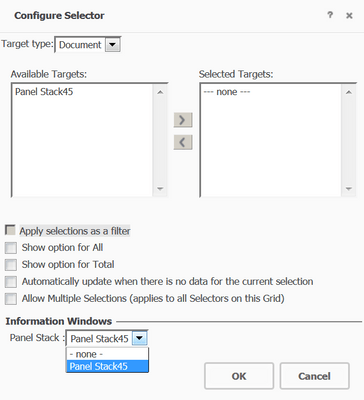
4. Choose Panel Stack from the drop down list from the Information Windows section.
ka04W000000OfRvQAK_0EM4400000029um.jpeg

5. Run document on ipad. See tapping on the attribute won't trigger the info window.
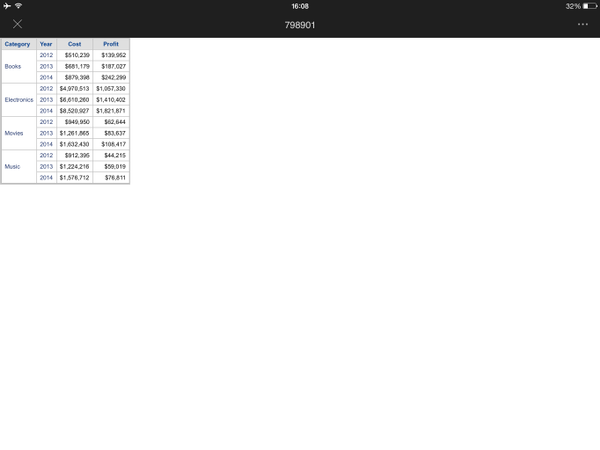
ka04W000000OfRvQAK_0EM4400000029uZ.jpeg

While in presentation mode info window can be triggered.
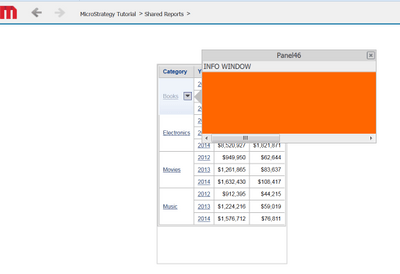
 

ka04W000000OfRvQAK_0EM4400000029ub.jpeg

CAUSE:
This is a known issue of Strategy Mobile 10.1.
 
ACTION:
Currently this issue is still being reviewed for feasibility by our Technology team and it is not scoped for any upcoming scheduled Strategy release.


Comment

0 comments

Details

Knowledge Article

Published:

April 14, 2017

Last Updated:

April 14, 2017