EducationSoftwareStrategy.com
StrategyCommunity

Knowledge Base

Product

Community

Knowledge Base

TopicsBrowse ArticlesDeveloper Zone

Product

Download SoftwareProduct DocumentationSecurity Hub

Education

Tutorial VideosSolution GalleryEducation courses

Community

GuidelinesGrandmastersEvents
x_social-icon_white.svglinkedin_social-icon_white.svg
Strategy logoCommunity

© Strategy Inc. All Rights Reserved.

LegalTerms of UsePrivacy Policy
  1. Home
  2. Topics

KB273065: The error "There is an error on the server. Request timeout" shows when adding external data through Query Builder in MicroStrategy Web


Community Admin

• Strategy


"There is an error on the server. Request timeout" when adding external data through Query Builder in MicroStrategy Web

SYMPTOM:
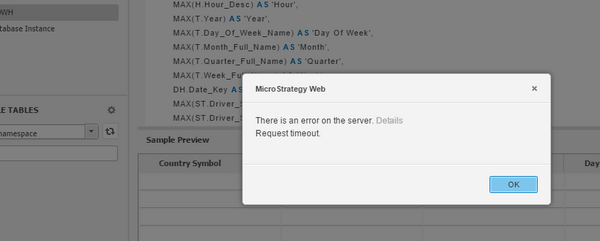
Users may experience a timeout after they have been trying to add external data for about 10 minutes:
ka04W000000rZPBQA2_0EM4400000025XF.jpeg


"There is an error on the server. Details 
Request timeout"

 
STEPS TO REPRODUCE:

  1. In Strategy Web, choose Create --> Add Extenal Data --> Database --> Type a query
  2. In the editor pick the relevant DB Instance on the left and then run the query you are typing on the right by pressing the "Execute SQL" button. (Alternatively to the "Execute SQL" button, you can press Finish-->Import as an in-memory Dataset)
  3. Queries running longer than 10 minutes will fail with a request timeout.

 
CAUSE:
By default, the request timeout for data import is set to 600000 milliseconds, i.e 10 minutes
 
ACTION:
Modify the following entry in WEB-INF/xml/sys_defaults.xml to a higher value:


<pr des="The alternative session request timeout value for Data Import tasks that take longer time to complete to override the default settings.(in milliseconds)" n="DIAlternativeSessionRequestTimeout" scp="server" v="600000" dt="integer"/>


Restart the web application server after making the change.


Comment

0 comments

Details

Knowledge Article

Published:

April 18, 2017

Last Updated:

November 28, 2023