EducationSoftwareStrategy.com
StrategyCommunity

Knowledge Base

Product

Community

Knowledge Base

TopicsBrowse ArticlesDeveloper Zone

Product

Download SoftwareProduct DocumentationSecurity Hub

Education

Tutorial VideosSolution GalleryEducation courses

Community

GuidelinesGrandmastersEvents
x_social-icon_white.svglinkedin_social-icon_white.svg
Strategy logoCommunity

© Strategy Inc. All Rights Reserved.

LegalTerms of UsePrivacy Policy
  1. Home
  2. Topics

KB273231: When inserting the Switch control style value, the values of unchanged records are inserted with 'On' value even if the checkbox is not selected in Transaction Service in MicroStrategy Web 9.x


Community Admin

• Strategy


When inserting the Switch control style value, the values of unchanged records are inserted with 'On' value even if the checkbox is not selected in Transaction Service in MicroStrategy Web 9.x

SYMPTOM:
  When inserting the Switch control style value, the values of unchanged records are inserted with 'On' value even if the checkbox is not selected in Transaction Service in Strategy Web 9.x
 
STEPS TO REPRODUCE:
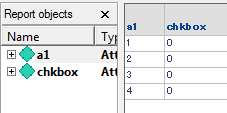
  • Create a report used for the grid in a transaction service document. The default checkbox value is set to zero as shown in the image below:
ka04W000000OaRmQAK_0EM4400000025Xq.jpeg
  • Create a transaction report to insert the records to empty database table with the following SQL query.
    
    insert into tran3_in values([a1@ID], [chkbox@ID])
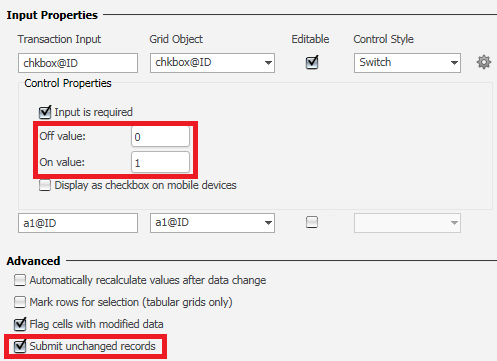
  • Create a Report Services document and configure the transaction as follows:
ka04W000000OaRmQAK_0EM4400000025Xr.jpeg
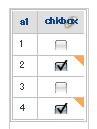
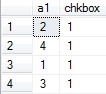
  • Run the Report Services document and check the record at 2nd and 4th rows:
ka04W000000OaRmQAK_0EM4400000025Xp.jpeg
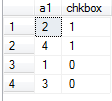
  • Note that the values of all the checkboxes are inserted with 1.
ka04W000000OaRmQAK_0EM4400000025Xm.jpeg

 
CAUSE:
This is a known issue with Strategy Web 9.x.
 
ACTION:
Currently this issue is being reviewed by Strategy for a potential code fix on an upcoming Strategy release.
 
WORKAROUND:
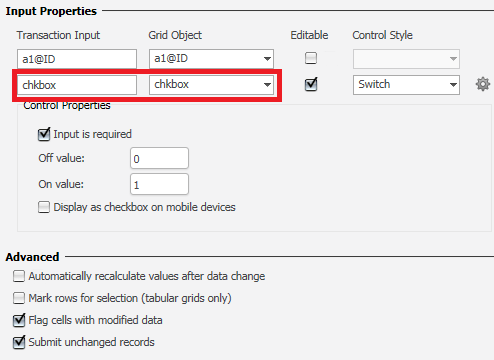
The check box value is inserted correctly by changing the object for Switch Control Style column from attribute to metric as shown in the image below:
 

ka04W000000OaRmQAK_0EM4400000025Xj.jpeg
ka04W000000OaRmQAK_0EM4400000025Xs.jpeg


KB273231


Comment

0 comments

Details

Knowledge Article

Published:

June 14, 2017

Last Updated:

December 24, 2018