SYMPTOM
The error message ‘Uh-oh, Error fetching the list of reports from external source’ is displayed when attempting to when attempting to click on the “Shared with me” folder in Strategy 10.1. See the example below:
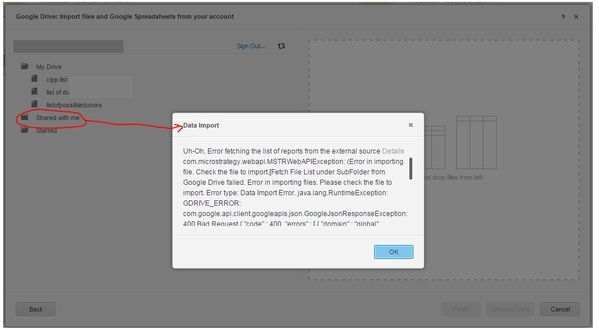
The full error reads as follows:
Uh-Oh, Error fetching the list of reports from the external source Details
com.Strategy.webapi.MSTRWebAPIException: (Error in importing file. Check the file to import.[Fetch File List under SubFolder from Google Drive failed. Error in importing files. Please check the file to import. Error type: Data Import Error. java.lang.RuntimeException: GDRIVE_ERROR: com.google.api.client.googleapis.json.GoogleJsonResponseException: 400 Bad Request { "code" : 400, "errors" : [ { "domain" : "global", "location" : "q", "locationType" : "parameter", "message" : "Invalid query", "reason" : "invalid" } ], "message" : "Invalid query" } at com.Strategy.Database.GDrive.GDriveImportHelper.HandleResponseException(Unknown Source) at com.Strategy.Database.GDrive.GDriveImportHelper.getFileListQ(Unknown Source) at com.Strategy.Database.GDrive.GDriveImportHelper.getChildren4LocalFolders(Unknown Source) at com.Strategy.Database.GDrive.GDriveImportHelper.getChildren(Unknown Source) . Connection String: BINARY;GOOGLEDRIVE;CLIENT_ID=806836613885-iad0ko6blu45et9majbq804ianvl7.apps.googleusercontent.com ;.])