SYMPTOM:
Unchanged cells also get modified when making changes to other cells in a transaction service grid in a document in Web. "Non-changing cells", are filled with values from other rows, where changes were made.
STEPS TO REPRODUCE:
1. Create a table.
CREATE TABLE [dbo].[testTS](
[ID] [int] NOT NULL,
[Enter1] [text] NULL,
[Enter2] [text] NULL,)

3. Create Transaction Service Report with update sql.
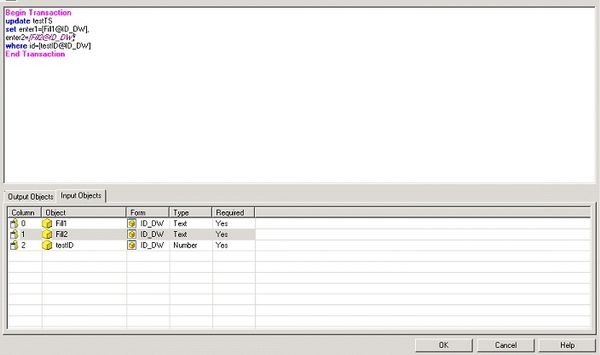
4. Create Document and Configure Transaction Service.
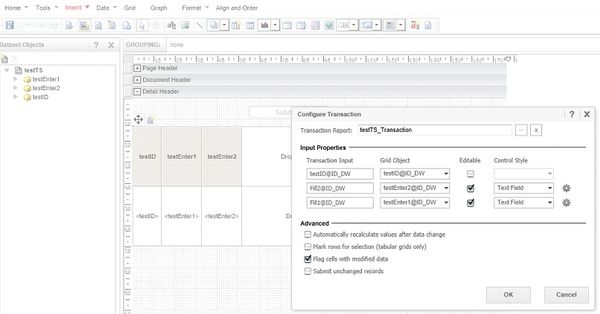
5. Use the document with one ID, two input fields. Values in Row 1 and Row2 are different.

6. Change value in field 1 in row1 and field 2 in row 2.

7. The result is not correct. The field 2 of row 1 picks values from the row 2, while the field 1 of row 2 picks value from row1.

CAUSE:
This is working as expected in Strategy 9.x and 10.x. For a transaction services grid, attribute elements with the same value seem to be different elements, but actually these elements with same ID form are saved as one single element for storage optimization. So updating one element results in the backend value for this element ID being changed so all displayed elements with this same ID will be updated to the new value. This occurs when the grid is re-calculated during the "Submit" action. However, this behavior only occurs with attributes and not for metrics.
WORKAROUND:
Changing the attribute to be metric should avoid this issue.
The Strategy Internal Reference Number for the issue discussed in this technical note is 788781.”
KB273308
