EducationSoftwareStrategy.com
StrategyCommunity

Knowledge Base

Product

Community

Knowledge Base

TopicsBrowse ArticlesDeveloper Zone

Product

Download SoftwareProduct DocumentationSecurity Hub

Education

Tutorial VideosSolution GalleryEducation courses

Community

GuidelinesGrandmastersEvents
x_social-icon_white.svglinkedin_social-icon_white.svg
Strategy logoCommunity

© Strategy Inc. All Rights Reserved.

LegalTerms of UsePrivacy Policy
  1. Home
  2. Topics

KB273666: How to access data wrangling during data import in MicroStrategy Web


Community Admin

• Strategy


How to access data wrangling during data import in MicroStrategy Web 10.2 and above?

DESCRIPTION
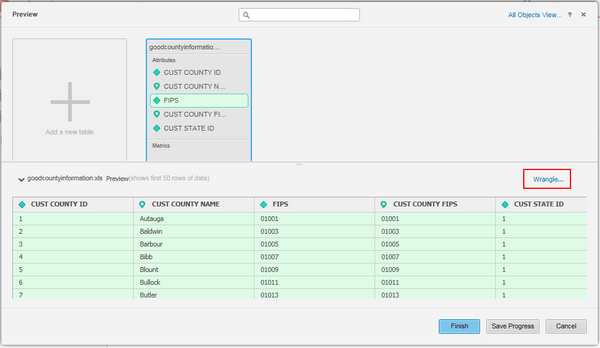
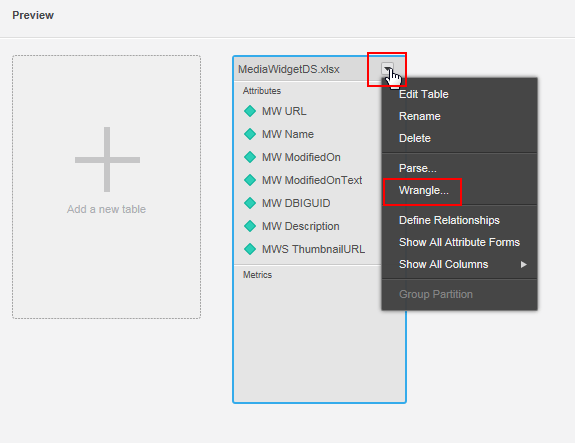
In Strategy 10.2 and above, the data wrangling button is only visible when expanding the data preview or by accessing the table context menu as seen below:
 
Expand data preview:
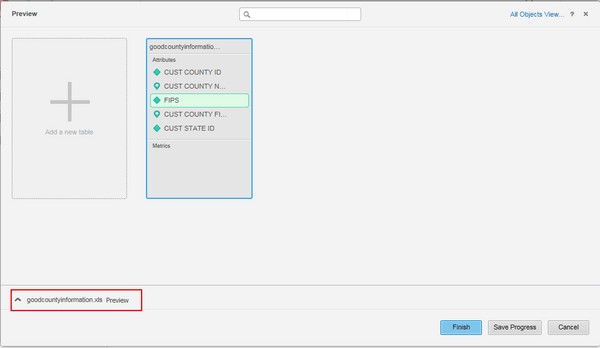
ka04W000000Og2cQAC_0EM440000002V5Q.jpeg

Select Wrangle...

ka04W000000Og2cQAC_0EM440000002V5U.jpeg

 
Access Wrangle through table context menu:
ka04W000000Og2cQAC_0EM440000002V5W.jpeg

Comment

0 comments

Details

Knowledge Article

Published:

July 12, 2017

Last Updated:

July 12, 2017