EducationSoftwareStrategy.com
StrategyCommunity

Knowledge Base

Product

Community

Knowledge Base

TopicsBrowse ArticlesDeveloper Zone

Product

Download SoftwareProduct DocumentationSecurity Hub

Education

Tutorial VideosSolution GalleryEducation courses

Community

GuidelinesGrandmastersEvents
x_social-icon_white.svglinkedin_social-icon_white.svg
Strategy logoCommunity

© Strategy Inc. All Rights Reserved.

LegalTerms of UsePrivacy Policy
  1. Home
  2. Topics

KB273983: "New Attribute Form" icon size is larger than other icons in the Attribute Editor of MicroStrategy Developer 10.x


Stefan Zepeda

Salesforce Solutions Architect • Strategy


This issue has been classified as a defect by MicroStrategy. The impact is limited to MicroStrategy Developer 10 Hotfix 1 product only browsing in the Attribute Editor. A solution/code fix for this issue has been addressed in MicroStrategy 10.1.

SUMMARY:
This issue has been classified as a defect by Strategy. The impact is limited to Strategy Developer 10 Hotfix 1 product only browsing in the Attribute Editor. A solution/code fix for this issue has been addressed in Strategy 10.1.
 
SYMPTOM:
When opening the Attribute Editor, the “New Form” icon is larger than the toolbar. This causes the container to be distorted.
 
STEPS TO REPRODUCE:
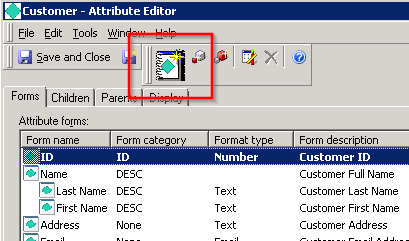
 

  1. Log into the Tutorial project via Developer
  2. Navigate to an attribute in the Schema Objects folder
  3. Edit the attribute
ka02R000000kbJmQAI_0EM440000002C3e.jpeg


CAUSE:
This is a known issue in Strategy Developer 10.x
 
ACTION:
Contact Strategy Technical Support for an updated status of this case.
 
The Strategy Internal Reference Number for the issue discussed in this technical note is DE31830.


Comment

0 comments

Details

Knowledge Article

Published:

June 8, 2017

Last Updated:

July 17, 2017