SUMMARY:
This issue has been classified as a defect by Strategy. The impact is limited to Strategy Web 9.4.1 product only when changing the column width of a Visual Insight grid when the attribute is in the columns and metrics in the rows. A solution/code fix for this issue is not available in current releases but is being reviewed for a future Strategy release.
SYMPTOM:
When the attributes are in the column and the metrics are in the rows, the user is unable to change the column width of a grid in a Visual Insight dashboard. The column with will revert back to the default size if it is changed.
STEPS TO REPRODUCE:
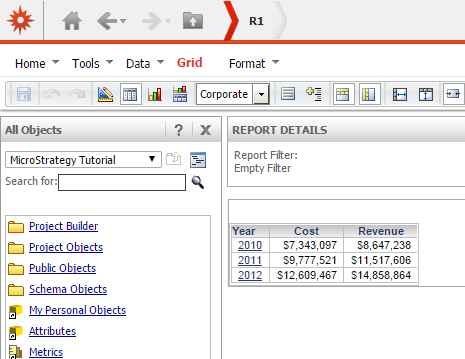
2. Create a Visual Insight Dashboard with report
3. Add Year to columns and Cost/Revenue to rows
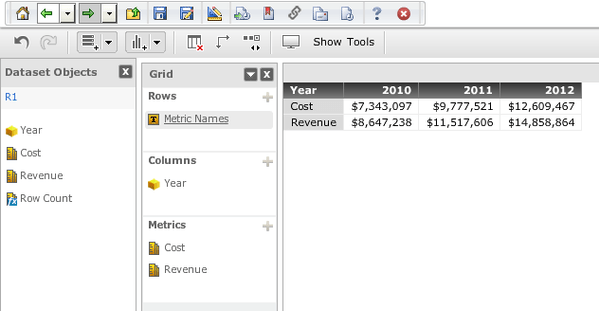
5.Change column width.
CAUSE:
This is a known issue in Strategy 9.4.1.
ACTION:
Contact Strategy Technical Support for an update on the status of the issue. Currently this issue is still being reviewed for feasibility by our Technology team and it is not scoped for any upcoming scheduled Strategy release.
WORKAROUND:
With the attributes set in the rows along with the metrics in the columns, change the column width to the preferred size and then switch the attributes to the columns and the metrics to the rows. The size of the width will be maintained.
TO LEARN MORE:
Related technotes:
KB47962 The row height becomes larger when columns are hidden manually by setting the width to 0 pixels in Strategy Web 9.x.
KB47132 Column width cannot be resized by dragging in Flash Mode when row headers are locked in Strategy Web 9.4.1.
KB45441 When a user designates a fixed value for a column width in a grid dataset of Strategy Desktop 9.3.x - 9.4.x document, the fixed column width always resets its value to a slightly lesser value.
Basic Reporting Guide 9.4.1
Chapter 2. Formatting a Report. Section: Formatting a grid report.
