EducationSoftwareStrategy.com
StrategyCommunity

Knowledge Base

Product

Community

Knowledge Base

TopicsBrowse ArticlesDeveloper Zone

Product

Download SoftwareProduct DocumentationSecurity Hub

Education

Tutorial VideosSolution GalleryEducation courses

Community

GuidelinesGrandmastersEvents
x_social-icon_white.svglinkedin_social-icon_white.svg
Strategy logoCommunity

© Strategy Inc. All Rights Reserved.

LegalTerms of UsePrivacy Policy
  1. Home
  2. Topics

KB274075: An error “You do not have Execute access to the xxx object” is displayed in a dashboard in MicroStrategy Web 9.4.1


Community Admin

• Strategy


An error “You do not have Execute access to the xxx object” is displayed in a dashboard in MicroStrategy Web 9.4.1

SYMPTOM:
An error “You do not have Execute access to the xxx object” is displayed in a dashboard for a user even though this user has sufficient privileges to all the grid objects. This issue has been classified as a defect.
 
STEPS TO REPRODUCE:
Follow the steps below to reproduce this issue in the Strategy Tutorial project: 
  1. Create an Intelligent Cube with the Region and Call Center attributes and the Units Sold metric.
  2. Change the Access Control List (ACL) for the Call Center attribute so that a user named “Demo” has the “Denied All” privilege for this attribute.
  3. Logon to Strategy Web as the “Demo” user
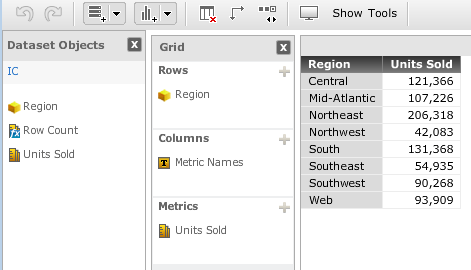
  4. Create a dashboard and add the objects as shown below. Since Call Center has the “Denied All” ACL for the Demo user, only the Region and Units Sold are visible.
ka04W000000OfpcQAC_0EM440000002C2r.jpeg


  1. Logon to Strategy Web using the Administrator user.
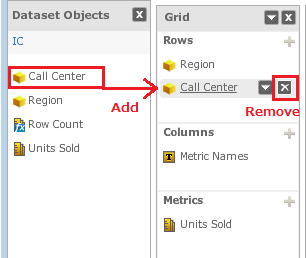
  2. Edit the dashboard created in Step 4. Add the Call Center attribute to the rows, then remove it from the grid, and save the dashboard. (no changes are technically made to the grid objects)
ka04W000000OfpcQAC_0EM440000002C2q.jpeg


  1. Logon to Strategy Web as the Demo user again and execute the dashboard. Although the Call Center attribute does not exist in the grid, the following error indicating an ACL issue will be displayed.
ka04W000000OfpcQAC_0EM440000002C2Y.jpeg


An error has occurred on this page.
Your request could not be processed. Please try again. If the problem persists, contact the Administrator.
(You do not have Execute access to the Attribute object ‘Call Center’. You do not have Strategy tutorial access to the %2 object ‘%3’.)


CAUSE:
This is a known issue in Strategy Web 9.4.1.
A reference to the Call Center attribute remains unexpectedly after Step 6, which prevents the Demo user from executing the Dashboard.
 
ACTION:
This issue has been fixed in Strategy 10.1.  Please upgrade to this version or a newer version to take advantage of the fix.
 
The Strategy Internal Reference Number for the issue discussed in this technical note is DE24213.
 
WORKAROUND:

  1. Grant the user/group the Execute permission. The user will still not be able to see the attribute but be able to execute the dashboard.
  2. Provide the metadata to Strategy Technical Support. Technical Support will assist in removing the reference(s) to the removed objects.

Comment

0 comments

Details

Knowledge Article

Published:

June 8, 2017

Last Updated:

July 17, 2017