EducationSoftwareStrategy.com
StrategyCommunity

Knowledge Base

Product

Community

Knowledge Base

TopicsBrowse ArticlesDeveloper Zone

Product

Download SoftwareProduct DocumentationSecurity Hub

Education

Tutorial VideosSolution GalleryEducation courses

Community

GuidelinesGrandmastersEvents
x_social-icon_white.svglinkedin_social-icon_white.svg
Strategy logoCommunity

© Strategy Inc. All Rights Reserved.

LegalTerms of UsePrivacy Policy
  1. Home
  2. Topics

KB274170: In Visual Insight "Exclude" action used multiple times in a row generates an error message “Invalid State” in Internet Explorer 9 in MicroStrategy 10.1


Community Admin

• Strategy


In Visual Insight "Exclude" action used multiple times in a row generates an error message “Invalid State” in Internet Explorer 9 in MicroStrategy 10.1

SUMMARY:
This issue has been classified as a defect by Strategy. The impact is limited to Strategy Web 10.1 where a user uses “Exclude” option in Visual Insight multiple times without pausing (from 15 to 35 times) and receives an error message  “Invalid State” in Internet Explorer 9. There is a workaround for this issue. The issue is under investigation by Technology team.  
  
SYMPTOM:
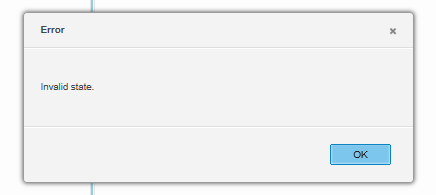
In Visual Insight, a user creates several grids where first targets all other and uses “Exclude” option to remove unwanted elements in a first grid visualization.  However, using this option multiple times generates an error “Invalid State” in Strategy 10.1 as shown below:
ka04W000000OgkLQAS_0EM4400000025W3.jpeg

 
STEPS TO REPRODUCE:
The issue is specific to Internet Explorer 9.

  1. Create a VI dashboard with a dataset that contains: Category, Subcategory, Item attributes and Profit metric
  2. Create 3 grid visualizations as shown below:
ka04W000000OgkLQAS_0EM4400000025WN.jpeg

3. First visualization targets second and third grid visualizations
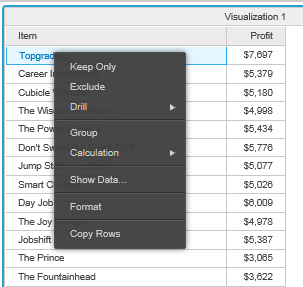
4. "Exclude" Item many times without pausing 
ka04W000000OgkLQAS_0EM4400000025W4.jpeg

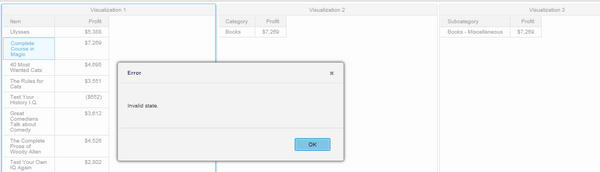
5.  At some point the error will occur. The error pops up after performing “Exclude” operation 15 - 40 times:
 

ka04W000000OgkLQAS_0EM4400000025WO.jpeg

 
CAUSE:
It appears to specifically affect Visual Insight dashboard after excluding attribute elements on a grid visualization in Internet Explorer 9 in Strategy Web 10.1. This has been classified as a defect.
 
ACTION
Currently this issue is still being reviewed for feasibility by our Technology team and it is not scoped for any upcoming scheduled Strategy release 
 
WORKAROUND:   

  • If possible, use a different browser or another version of Internet Explorer but Internet Explorer 9

 
ADDITIONAL TROUBLESHOOTING:
If the steps above do not resolve the issue, please consider calling Strategy tech support with the following information of troubleshooting already done:

  • Results of testing the workarounds, provide  steps to reproduce the issue, an engineer will test to confirm if it is the same issue 


Comment

0 comments

Details

Knowledge Article

Published:

June 12, 2017

Last Updated:

June 12, 2017