SUMMARY:
This issue has been classified as a defect by Strategy. The impact is limited to Strategy Developer 10 product only when enabling available built-in schedule objects. A solution/code fix for this issue is not available in current releases but is being reviewed for a future Strategy release.
SYMPTOM:
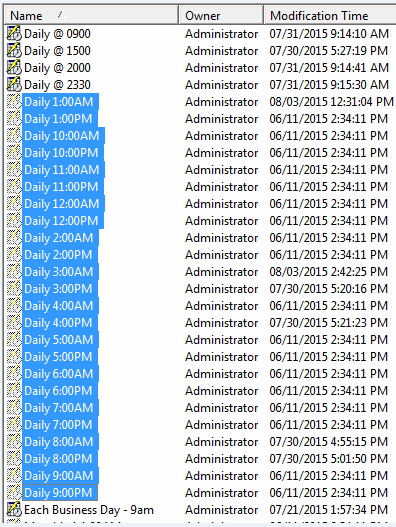
When navigating to the "Schedule" section under "Administration/Configuration Managers", built-in schedules are disabled and cannot be enabled.
STEPS TO REPRODUCE:
1. Log into the Tutorial project via Developer
2. Navigate to Administration > Configuration Managers > Schedules

3. Schedules are greyed out
CAUSE:
These are new system created schedules created starting in Strategy 10.x. These are hidden so they do not show up when creating any new subscription, but can be used for Administrative Tasks.
ACTION:
Currently this issue is still being reviewed for feasibility by Strategy and it is not scoped for any upcoming scheduled Strategy release.
WORKAROUND:
If these hidden system created schedules are not desired, they can be deleted and recreated for normal use.
The Strategy Internal Reference Number for the issue discussed in this technical note is DE39129.
