EducationSoftwareStrategy.com
StrategyCommunity

Knowledge Base

Product

Community

Knowledge Base

TopicsBrowse ArticlesDeveloper Zone

Product

Download SoftwareProduct DocumentationSecurity Hub

Education

Tutorial VideosSolution GalleryEducation courses

Community

GuidelinesGrandmastersEvents
x_social-icon_white.svglinkedin_social-icon_white.svg
Strategy logoCommunity

© Strategy Inc. All Rights Reserved.

LegalTerms of UsePrivacy Policy
  1. Home
  2. Topics

KB274332: Exporting a document in presentation mode does not prompt for all or single layout in MicroStrategy Web 10.1-10.5.


Community Admin

• Strategy


When exporting a document with multiple layouts in presentation mode, MicroStrategy Web 10.1 export only the active layout rather than providing a prompt to select layout options

SYMPTOM:
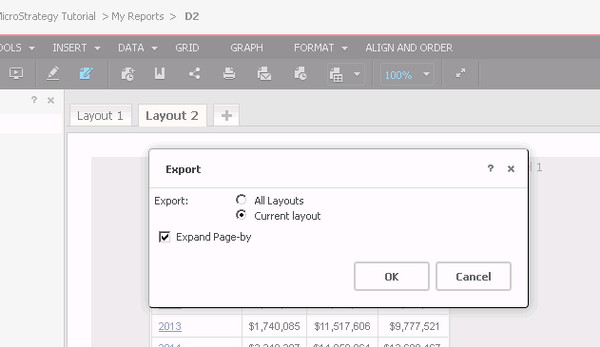
When exporting a document with multiple layouts in presentation mode, Strategy Web 10.1 export only the active layout rather than providing a prompt to select layout options. Strategy Web 10.1 prompts with a layout option in Interactive mode, as seen below.
ka04W000000OhgnQAC_0EM4400000025WU.jpeg

STEPS TO REPRODUCE:

  • Log into the Tutorial project via Strategy Web..
  • Open a document with multiple layouts in Interactive mode.
  • Export to Excel or PDF. The layout prompt appears, as shown below.
ka04W000000OhgnQAC_0EM4400000025WU.jpeg
  • Open the same document in Presentation mode.
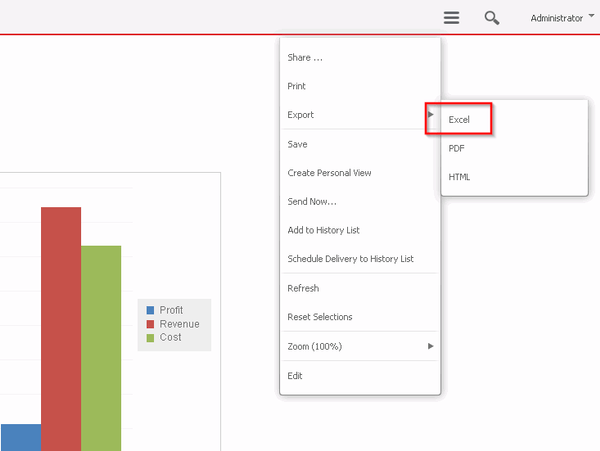
  • Export to Excel. The document is exported to Excel directly and only the active layout is exported.


ka04W000000OhgnQAC_0EM4400000025WT.jpeg

                                              
CAUSE:
This is an identified defect in Strategy Web 10.1 -10.5.
ACTION:
This issue has been addressed in Strategy Web 10.4 HF2 and 10.6. Upgrade to this version to take advantage of this fix. 
The Strategy Internal Reference Number for the issue discussed in this technical note is DE20154.


Comment

0 comments

Details

Knowledge Article

Published:

April 25, 2017

Last Updated:

April 25, 2017