EducationSoftwareStrategy.com
StrategyCommunity

Knowledge Base

Product

Community

Knowledge Base

TopicsBrowse ArticlesDeveloper Zone

Product

Download SoftwareProduct DocumentationSecurity Hub

Education

Tutorial VideosSolution GalleryEducation courses

Community

GuidelinesGrandmastersEvents
x_social-icon_white.svglinkedin_social-icon_white.svg
Strategy logoCommunity

© Strategy Inc. All Rights Reserved.

LegalTerms of UsePrivacy Policy
  1. Home
  2. Topics

KB274356: "Error when answering the prompt" error occurs in an Attribute Qualification Prompt when answering with decimal values in MicroStrategy Web 10


Community Admin

• Strategy


"Error when answering the prompt" error occurs in an Attribute Qualification Prompt when answering with decimal values in MicroStrategy Web 10

SYMPTOM:
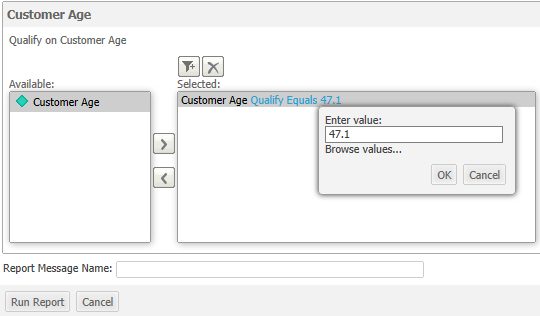
In Strategy Web 9.4.x, a report could contain an Attribute Qualification prompt for an attribute with numeric data. If that numeric data contained decimals, users could answer the prompt by typing in the decimal value, as shown below:
ka04W000000ObNHQA0_0EM440000002SnC.jpeg

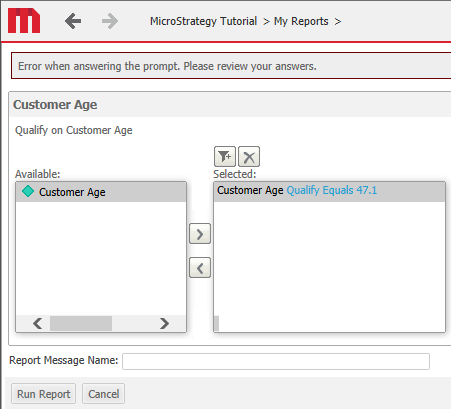
However, when answering the same prompt in Strategy Web 10.x, the following error occurs:
ka04W000000ObNHQA0_0EM440000002Snk.jpeg


Error when answering the prompt. Please review your answers.
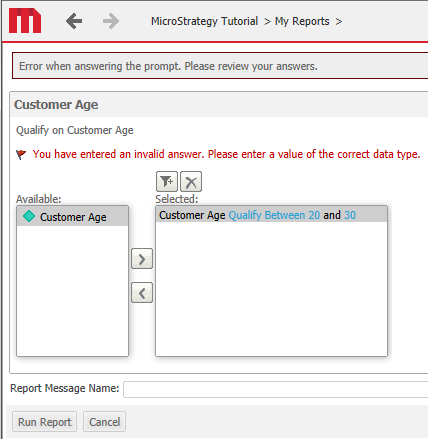
 
 
If, while this error is displayed, on the page, the user attempts to change the qualification to 'Between' or 'Not Between', the following error occurs:

ka04W000000ObNHQA0_0EM440000002SnE.jpeg


You have entered an invalid answer. Please enter a value of the correct data type.


This second error, does not occur with other qualifications or if the prompt is re-executed.
 
STEPS TO REPRODUCE:
Follow these steps to reproduce the issue in a Strategy Tutorial Project.

  1. Create an Attribute Qualification prompt on an attribute such as Customer Age. Note, this attribute does not contain decimal data, but decimal data can be added to it in the warehouse table.
  2. Add this prompt to a report with the Customer Age and Customer attributes.
  3. Run the report and answer the qualification prompt with a decimal number. Notice the error.
  4. Switch the qualification to Between, and notice the second error.

 
CAUSE:
This is an identified defect in Strategy Web 10.
 
ACTION:
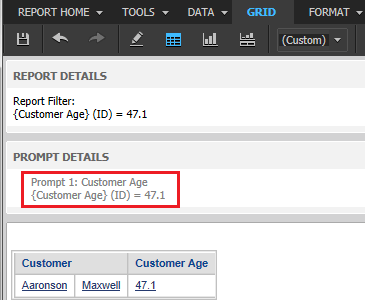
This issue has been addressed in Strategy Web 10.2. Upgrade to this version to take advantage of this fix. Now the prompt should resolve correctly, as seen below:
ka04W000000ObNHQA0_0EM440000002Snd.jpeg

 
This issue has been fixed in Strategy 10.2
274356


Comment

0 comments

Details

Knowledge Article

Published:

June 29, 2017

Last Updated:

March 31, 2019