SYMPTOM:
In a Report Services Document, when an information window is triggered from a button, a user attempts to find a particular attribute element in a search box selector; however, using a scroll bar in a result dropdown list, the information window disappears leaving the user only with search results in Strategy Web 9.3.x, 9.4.x, 9.5.x in Express mode as shown below:

STEPS TO REPRODUCE:
10. Select Source as Customer, uncheck ‘Apply selection as filter’ and check “Show option for All”
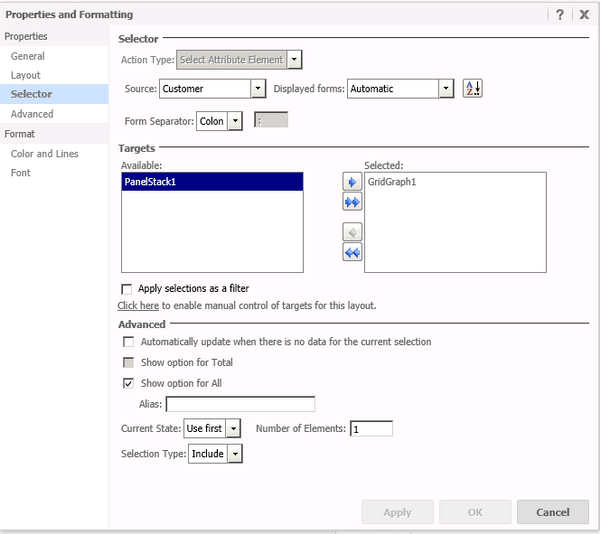
11. Now add a Button (Insert menu->Button->Icon only) to the document and give an image to the button (optional).
12. In General Properties of this button select the Panel Stack (information window
13. Save the document.
14. Execute the document in “Express mode”
15. Click on the button image. The information window will pop up
16. Type characters ‘wer’ (without the quotes) in the Search box. A suggestions dropdown will be displayed with a scroll bar.

17. Use a scrollbar and observe that a suggestion drop down is visible while the information window disappears

CAUSE:
It appears to specifically affect Strategy Web 9.3.x, 9.4.x, 9.5.x. This has been classified as a defect.
ACTION/WORKAROUND
The issue has been addressed in Strategy 10. Please upgrade to that version to benefit from the fix.
