EducationSoftwareStrategy.com
StrategyCommunity

Knowledge Base

Product

Community

Knowledge Base

TopicsBrowse ArticlesDeveloper Zone

Product

Download SoftwareProduct DocumentationSecurity Hub

Education

Tutorial VideosSolution GalleryEducation courses

Community

GuidelinesGrandmastersEvents
x_social-icon_white.svglinkedin_social-icon_white.svg
Strategy logoCommunity

© Strategy Inc. All Rights Reserved.

LegalTerms of UsePrivacy Policy
  1. Home
  2. Topics

KB274382: Threshold Legend values are not accurately displayed in MicroStrategy Visual Insight 9.4.x.


Community Admin

• Strategy


Threshold Legend values are not accurately displayed in MicroStrategy Visual Insight 9.4.x.

SUMMARY:
This issue has been classified as a defect by Strategy. The impact is limited to Strategy Visual Insight 9.4.x when viewing a dashboard with threshold legends. The issue is under investigation for a permanent fix by the Strategy Technology team.  
 
SYMPTOM:
In Strategy Visual Insight  9.4.x when viewing a dashboard where a threshold is set on a percent metric the legends display incorrectly with the negative range displaying positive values if the selection chosen does not have any negative values as seen below.

ka04W000000OfpbQAC_0EM4400000025Wy.jpeg

 
STEPS TO REPRODUCE:
To reproduce this issue in Strategy Tutorial do the following:
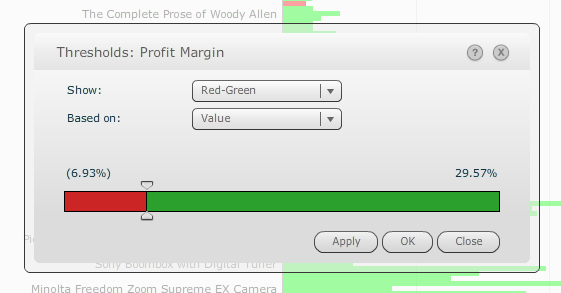
  • Create a dataset with Category, Item, Revenue, and Profit Margin.
  • Use this dataset to create VI dashboard.
  • Add the Vertical bar chart as the visualization with Item on the vertical axis, Revenue on the horizontal axis, color by Profit margin, and Filter by Category.
  • Set up a threshold on Profit Margin to display negative values - 0 as red, and 0 - the top value as green.        

ka04W000000OfpbQAC_0EM4400000025X0.jpeg
  • Notice when Electronics is selected which has no negative values for Profit Margin, the legend displays 13.41% - 0.0% as red and 0.0% - 20.32% as green.

ka04W000000OfpbQAC_0EM4400000025Wp.jpeg

 
CAUSE:
This has been classified as a defect with Strategy Web 9.4.x.
 
ACTION:
This issue is addressed in Strategy Web 10.1. Upgrade to this or a later version to take advantage of the fix.


Comment

0 comments

Details

Knowledge Article

Published:

May 31, 2017

Last Updated:

July 17, 2017