EducationSoftwareStrategy.com
StrategyCommunity

Knowledge Base

Product

Community

Knowledge Base

TopicsBrowse ArticlesDeveloper Zone

Product

Download SoftwareProduct DocumentationSecurity Hub

Education

Tutorial VideosSolution GalleryEducation courses

Community

GuidelinesGrandmastersEvents
x_social-icon_white.svglinkedin_social-icon_white.svg
Strategy logoCommunity

© Strategy Inc. All Rights Reserved.

LegalTerms of UsePrivacy Policy
  1. Home
  2. Topics

KB274531: A Visual Insight dashboard will lose the formatting of a grid when scrolling down in MicroStrategy Web 10.0


Community Admin

• Strategy


In MicroStrategy Web 10.0, when a Visual Insight dashboard is designed to contain attributes and metrics in the rows drop zone and additional attributes in the columns drop zone, the grid loses its formatting when scrolling through the grid.

SYMPTOM:
In Strategy Web 10.0, when a Visual Insight dashboard is designed to contain attributes and metrics in the rows drop zone and additional attributes in the columns drop zone, the grid loses its formatting when scrolling through the grid.
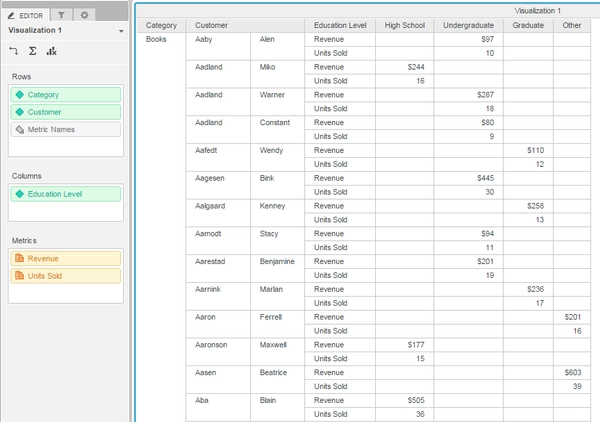
Before scrolling:
ka04W000000Oh8mQAC_0EM4400000025XI.jpeg

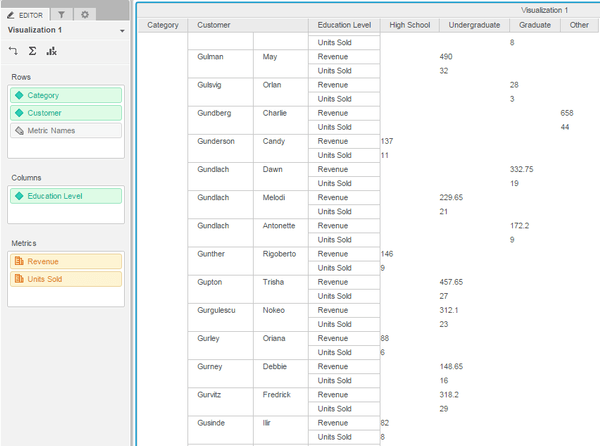
After scrolling down a few rows:

ka04W000000Oh8mQAC_0EM4400000025XG.jpeg

 
STEPS TO REPRODUCE:

  1. Create a report containing the attributes Category, Customer, and Education Level and the metrics Revenue and Units Sold.
  2. Create a VI dashboard.
  3. Add the report created in step 1 to the VI dashboard.
  4. Add the attributes Category and Customer and the metrics to the Rows drop zone.
  5. Add the Education Level attribute to the Columns drop zone.
  6. Notice the formatting of the grid appears correctly.
  7. Scroll down the grid to see the gridlines disappear.

 
CAUSE:
This is an identified defect in Strategy Web 10.0.
 
ACTION:
This issue has been fixed in Strategy Web 10.2. Take advantage of upgrading for a fix.
 
The Strategy Internal Reference Number for the issue discussed in this technical note is DE20658.


Comment

0 comments

Details

Knowledge Article

Published:

June 1, 2017

Last Updated:

June 1, 2017