EducationSoftwareStrategy.com
StrategyCommunity

Knowledge Base

Product

Community

Knowledge Base

TopicsBrowse ArticlesDeveloper Zone

Product

Download SoftwareProduct DocumentationSecurity Hub

Education

Tutorial VideosSolution GalleryEducation courses

Community

GuidelinesGrandmastersEvents
x_social-icon_white.svglinkedin_social-icon_white.svg
Strategy logoCommunity

© Strategy Inc. All Rights Reserved.

LegalTerms of UsePrivacy Policy
  1. Home
  2. Topics

KB274536: The Recents menu does not disappear in a Report Services Document in Editable mode or Design mode, in MicroStrategy Web 10.1


Community Admin

• Strategy


The Recents menu does not disappear in a Report Services Document in Editable mode or Design mode, in MicroStrategy Web 10.1

SYMPTOM:
In Strategy Web 10.1, the Strategy logo dropdown provides a new feature to find the objects that have been executed recently, "Recents", as shown below.
 

ka04W000000Oc1HQAS_0EM4400000025X8.jpeg

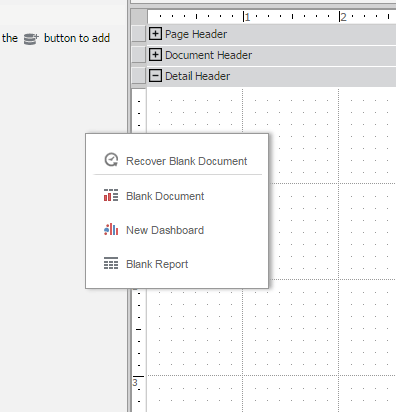
However, if the Recents menu is accessed from inside the Design mode or Editable mode of a Report Services Document, the menu will remain displayed even after clicking on the document page, as seen in the image below.
ka04W000000Oc1HQAS_0EM4400000025X9.jpeg

 
STEPS TO REPRODUCE:

  1. Create a new document.
  2. Click the arrow to the right of the top left Strategy logo.
  3. Hover over "Recents" in the dropdown menu.
  4. Hover over the items in the Recents menu.
  5. Click outside of the Recents menu.
  6. The dropdown menu disappears, but the list of recent documents remains.

 
CAUSE:
This is an identified defect in Strategy Web 10.1.
 
ACTION:
This issue has been addressed in Strategy Web 10.2. Upgrade to this version to take advantage of the fix. 
 
WORKAROUND:
The Recents menu disappears when clicking on "Recents" in the Strategy logo dropdown.


Comment

0 comments

Details

Knowledge Article

Published:

May 30, 2017

Last Updated:

May 30, 2017