EducationSoftwareStrategy.com
StrategyCommunity

Knowledge Base

Product

Community

Knowledge Base

TopicsBrowse ArticlesDeveloper Zone

Product

Download SoftwareProduct DocumentationSecurity Hub

Education

Tutorial VideosSolution GalleryEducation courses

Community

GuidelinesGrandmastersEvents
x_social-icon_white.svglinkedin_social-icon_white.svg
Strategy logoCommunity

© Strategy Inc. All Rights Reserved.

LegalTerms of UsePrivacy Policy
  1. Home
  2. Topics

KB274539: "You must save the document before you can subscribe to it" prompt appears when creating a personal view from Interactive or Flash modes in MicroStrategy Web 10.1


Community Admin

• Strategy


This article details the following : A personal view allows users to create a subscription to a document with personal selections. In MicroStrategy Web 10.1, when creating a personal view from Interactive or Flash modes, will prompt the user to save the document

SYMPTOM:
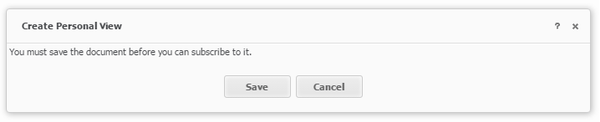
A personal view allows users to create a subscription to a document with personal selections. In Strategy Web 10.1, when creating a personal view from Interactive or Flash modes, will prompt the user to save the document, as shown below: 
ka04W000000Of9IQAS_0EM4400000025X7.jpeg


"You must save the document before you can subscribe to it." 

However, not all users have the privileges to save the document, or saving the document would save any changes made for all users, defeating the purpose of creating a personal view.     
STEPS TO REPRODUCE:

  1. Create a report containing one attribute and metric.
  2. Add the report to a new document.
  3. Insert a grid containing the attribute and metric.
  4. Insert a selector targeting the attribute in the grid.
  5. Run the document in Flash mode.
  6. Change the selector value.
  7. Create a personal view by selecting Document Home > Create Personal View in the toolbar.
  8. Notice the notification to save the document appears.

 
CAUSE:
This is an identified defect in Strategy Web 10.1.
 
ACTION:
This issue was reviewed by our Technology team for feasibility and will not be scoped for a code fix in any upcoming Strategy release.
In Strategy Web 10.1, Interactive and Flash modes are deprecated modes, it is recommended to use Presentation mode instead. For more information on Presentation mode, refer to tech noteKB40298: New Feature in 9.3.0 Strategy Web: Personal View - Strategy Community
WORKAROUND:
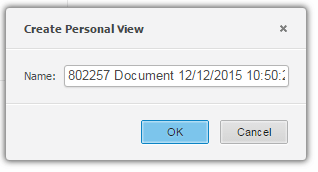
Users should create personal views in Presentation mode rather than Interactive or Flash modes. In Presentation mode, a window appears to name and save the personal view, as seen below. 
ka04W000000Of9IQAS_0EM4400000025X6.jpeg

The Strategy Internal Reference Number for the issue discussed in this technical note is DE23562.


Comment

0 comments

Details

Knowledge Article

Published:

June 1, 2017

Last Updated:

June 1, 2017