EducationSoftwareStrategy.com
StrategyCommunity

Knowledge Base

Product

Community

Knowledge Base

TopicsBrowse ArticlesDeveloper Zone

Product

Download SoftwareProduct DocumentationSecurity Hub

Education

Tutorial VideosSolution GalleryEducation courses

Community

GuidelinesGrandmastersEvents
x_social-icon_white.svglinkedin_social-icon_white.svg
Strategy logoCommunity

© Strategy Inc. All Rights Reserved.

LegalTerms of UsePrivacy Policy
  1. Home
  2. Topics

KB274546: How to prevent users from accessing dataset, editor, properties filter panels and visualization gallery in Visual Insight 10.x


Community Admin

• Strategy


Users that are required to solely consume Visual Insight Dashboards without the possibility make changes or review dataset objects and filters, administrators may control functionality available to a given user or group through privileges:
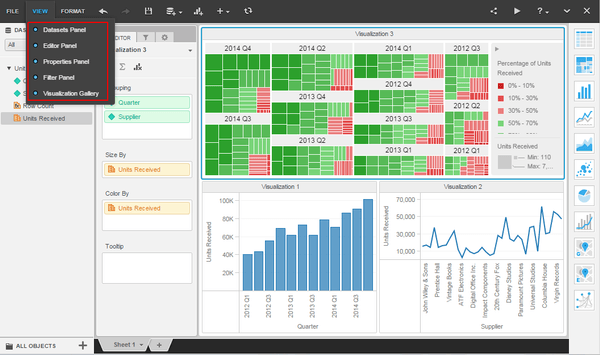
ka04W000000OciqQAC_0EM440000002V5e.jpeg

 
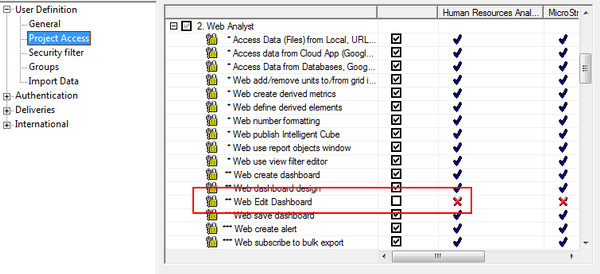
In order to prevent users from seeing the above panels, remove the Web Analyst privilege "Web Edit Dashboard":
 

ka04W000000OciqQAC_0EM440000002V5h.jpeg

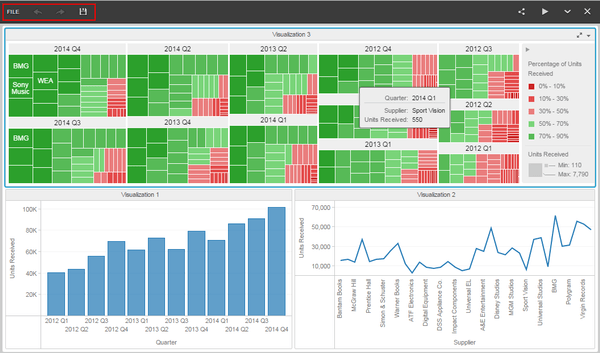
In consequence, users are only able to view the current state of the VI Dashboard:
 

ka04W000000OciqQAC_0EM440000002V5c.jpeg

Comment

0 comments

Details

Knowledge Article

Published:

July 12, 2017

Last Updated:

July 12, 2017