EducationSoftwareStrategy.com
StrategyCommunity

Knowledge Base

Product

Community

Knowledge Base

TopicsBrowse ArticlesDeveloper Zone

Product

Download SoftwareProduct DocumentationSecurity Hub

Education

Tutorial VideosSolution GalleryEducation courses

Community

GuidelinesGrandmastersEvents
x_social-icon_white.svglinkedin_social-icon_white.svg
Strategy logoCommunity

© Strategy Inc. All Rights Reserved.

LegalTerms of UsePrivacy Policy
  1. Home
  2. Topics

KB274628: Standalone dropdown filter in a Visual Insight dashboard displays as a line when “Show option for All” is disabled in MicroStrategy Web 10.0


Community Admin

• Strategy


Standalone dropdown filter in a Visual Insight dashboard displays as a line when “Show option for All” is disabled in MicroStrategy Web 10.0

SYMPTOM:
In Strategy Web 10.0, standalone filters can be used to target visualization in a Visual Insight dashboard, as shown below.

ka04W000000Oc40QAC_0EM4400000025WF.jpeg

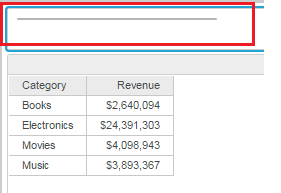
However, when unchecking the “Show option for All” with the filter set to (All), the dropdown filter selector appears incorrectly as shown below.
ka04W000000Oc40QAC_0EM4400000025WD.jpeg

 
STEPS TO REPRODUCE:

  • Create a new Visual Insight and add a report that contains an attribute to the dashboard.
  • Add an attribute to the Rows drop zone.
  • Insert a standalone filter to the dashboard.
  • Drag the attribute placed in the VI grid to the filter.
  • Press the Select Target button.
  • Click on the visualization containing the grid with the attribute.
  • Click the Apply button in the filter.
  • Hover over the top right corner of the filter click on the triangle.
  • Change the display style of the filter to dropdown, as shown below.                                                                
ka04W000000Oc40QAC_0EM4400000025WM.jpeg
  • Uncheck the “Show option for All” setting in the Properties panel, as shown below.
ka04W000000Oc40QAC_0EM4400000025WK.jpeg
  • Notice that the filter appears as only a line.

 
CAUSE:
This is an identified defect in Strategy Web 10.
 
ACTION:
This issue has been addressed in Strategy Web 10.1. Upgrade to this version to take advantage of this fix.
 
WORKAROUND:
This issue only occurs when unchecking the “Show option for All” setting when (All) is selected. Therefore, switch to a single element option, then uncheck this setting to prevent this issue.


Comment

0 comments

Details

Knowledge Article

Published:

May 29, 2017

Last Updated:

May 29, 2017