EducationSoftwareStrategy.com
StrategyCommunity

Knowledge Base

Product

Community

Knowledge Base

TopicsBrowse ArticlesDeveloper Zone

Product

Download SoftwareProduct DocumentationSecurity Hub

Education

Tutorial VideosSolution GalleryEducation courses

Community

GuidelinesGrandmastersEvents
x_social-icon_white.svglinkedin_social-icon_white.svg
Strategy logoCommunity

© Strategy Inc. All Rights Reserved.

LegalTerms of UsePrivacy Policy
  1. Home
  2. Topics

KB274645: When two or more visualizations are used as Filter with "Highlight data on selection" in a Visual Insight dashboard, the highlight fails for all other visualizations used as filters in MicroStrategy Web 10.1


Community Admin

• Strategy


When two or more visualizations are used as Filter with "Highlight data on selection" in a Visual Insight dashboard, the highlight fails for all other visualizations used as filters in MicroStrategy Web 10.1

SYMPTOM:
In Strategy Web 10.0, visualizations can be used as filters that target other visualizations. Data can either be filtered or highlighted on selection. However, when two or more visualizations are used as filters and set to highlight data on selection, the highlighting will not appear on any visualization also used as a filter set to hightlight data on selection as seen below.

ka04W000000OfvgQAC_0EM4400000025WB.jpeg

In the image above, the firsrt 2 visualizations are filters set to highlight, and only the third visualization that has not been set to be used as a filter, highlights the data as designed. The other visualizations that are set to be used as a filters and highlight do not get highlighted at all. 
 
STEPS TO REPRODUCE:
  • Create a report with Category, Profit, Cost, and Revenue.
  • Add the report to a VI dashboard.
  • Add two additional visualizations to the dashboard.
  • Add Category and Cost to the first visualization.
  • Add Category and Profit to the second visualization.
  • Add Category and Revenue to the third visualization.
  • Hover over the visualization and click on the top right corner arrow to pull out the menu.
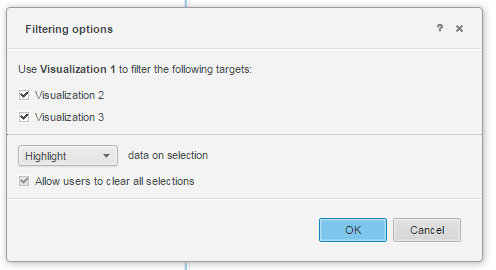
  • Click on "Use as filter" to set the first visualization as a filter targeting the other two visualization with the 'data on selection' setting set to "Highlight", as shown below.
ka04W000000OfvgQAC_0EM4400000025WI.jpeg
  • Click on an element to notice that the highlighting behaves as designed on the other 2 visualizations.
  • Repeat steps 7 and 8 on the second visualization to target the other two visualization with the 'data on selection' setting set to "Highlight"
  • Click on an element to notice that only the visualization that is not used as a filter hightlights correctly, while visualization 1 does not highlight at all.

 
CAUSE:
This is an identified defect in Strategy Web 10.1.
 
ACTION:
Currently this issue is still being reviewed for feasibility by our Technology team and it is not scoped for any upcoming scheduled Strategy release.


Comment

0 comments

Details

Knowledge Article

Published:

May 30, 2017

Last Updated:

May 30, 2017