EducationSoftwareStrategy.com
StrategyCommunity

Knowledge Base

Product

Community

Knowledge Base

TopicsBrowse ArticlesDeveloper Zone

Product

Download SoftwareProduct DocumentationSecurity Hub

Education

Tutorial VideosSolution GalleryEducation courses

Community

GuidelinesGrandmastersEvents
x_social-icon_white.svglinkedin_social-icon_white.svg
Strategy logoCommunity

© Strategy Inc. All Rights Reserved.

LegalTerms of UsePrivacy Policy
  1. Home
  2. Topics

KB274971: Disabling the Legend for a Heat Maps in a Visual Insight dashboard still shows the legend in MicroStrategy Mobile 10.1


Community Admin

• Strategy


Disabling the Legend for a Heat Maps in a Visual Insight dashboard still shows the legend in MicroStrategy Mobile 10.1

SYMPTOM: 
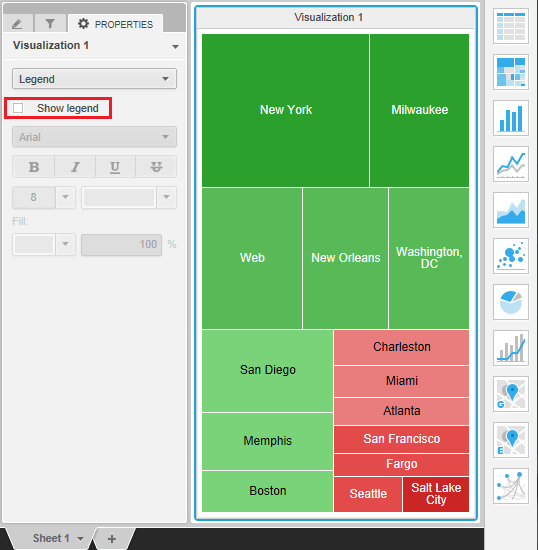
In Strategy Web 10.1, when using a heat map visualization in a Visual Insight dashboard, users can disable the display of the legend as shown below:
ka04W000000OhnjQAC_0EM4400000029uH.jpeg

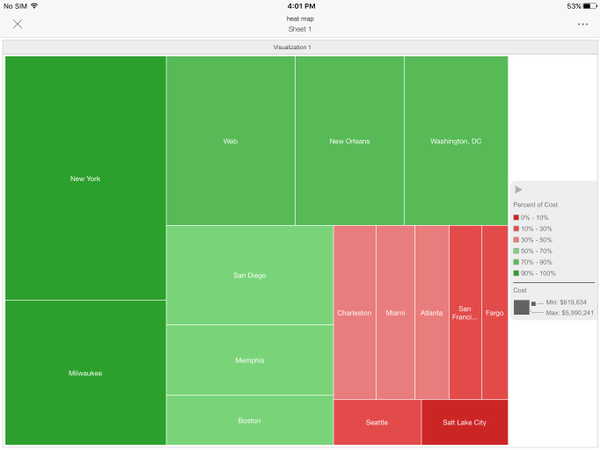
However, running the same dashboard in Strategy Mobile 10, will continue to display the legend, as shown below:
ka04W000000OhnjQAC_0EM4400000029uD.jpeg

STEPS TO REPRODUCE: 
Follow these steps to reproduce the issue in a Strategy Tutorial Project.

  1. Create a VI dashboard with one attribute and one metric.
  2. Change the visualization to a heat map.
  3. Go into the Properties pane and select 'Legend' on the dropdown.
  4. Uncheck the 'Show legend' option. 
  5. Save the dashboard.
  6. Run it in Strategy Mobile 10 on an iPad. Notice the legend still appears, even though it has been disabled.

CAUSE:
This is an identified defect in Strategy Mobile 10.1 Mobile client.
ACTION:
This issue was addressed since Strategy Mobile client 10.3, please upgrade to the Strategy Mobile client or above to take advantage of this fix.
The Strategy Internal Reference Number for the issue discussed in this technical note is DE22171.


Comment

0 comments

Details

Knowledge Article

Published:

April 13, 2017

Last Updated:

April 13, 2017