Currently this issue is being reviewed by Strategy for a potential code fix on an upcoming Strategy release.
SYMPTOM:
When browsing through an Object Prompt using the folder structure the folder display may display invalid folder structures. For example a folder can be shown as being within itself as seen in the following image.
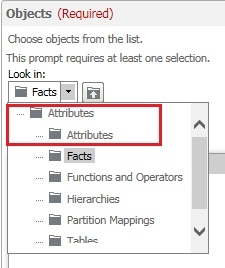
As can be seen the attributes folder is shown within the attributes folder which is not correct or valid. This only happens after browsing up and down the folder structures within the prompt interface.
CAUSE:
This is a known issue in the Web GUI in Strategy 10.2.
ACTION:
This issue has been addressed in Strategy 10.3.
WORKAROUND:
This currently only effects the GUI. The folders can still be browsed through as needed and objects can be chosen in the answer to the security filters as needed.
