EducationSoftwareStrategy.com
StrategyCommunity

Knowledge Base

Product

Community

Knowledge Base

TopicsBrowse ArticlesDeveloper Zone

Product

Download SoftwareProduct DocumentationSecurity Hub

Education

Tutorial VideosSolution GalleryEducation courses

Community

GuidelinesGrandmastersEvents
x_social-icon_white.svglinkedin_social-icon_white.svg
Strategy logoCommunity

© Strategy Inc. All Rights Reserved.

LegalTerms of UsePrivacy Policy
  1. Home
  2. Topics

KB275030: Documents fit to width and fit to page after resizing browser window using presentation mode in MicroStrategy Web 10.2.


Community Admin

• Strategy


Documents fit to width and fit to page after resizing browser window using presentation mode in MicroStrategy Web 10.2.

DESCRIPTION
When saving a document with zoom level fit to width or fit to page and executing the document with a resized browser window, the document zoom level is not adapted to the browser window size until the user resizes the browser.
 
STEPS TO REPRODUCE
1. In Strategy Tutorial execute "Category Performance Dashboard" from Shared Reports > Documents and Scorecards.
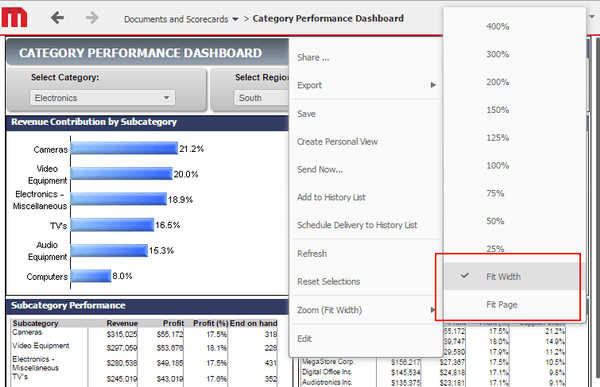
2. Set the zoom level to fit to width:
 

ka04W000000OciHQAS_0EM440000002V5b.jpeg

 
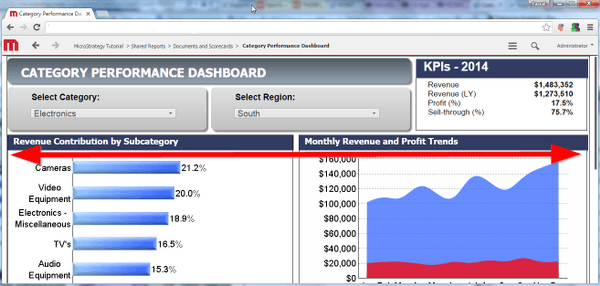
3. Note how the document width fits the width of the browser window:

ka04W000000OciHQAS_0EM440000002V5Z.jpeg

 
4. Save and close the document. Resize the browser window and execute the document again. Note how the document width does not adjust to the new browser window size:

ka04W000000OciHQAS_0EM440000002V5g.jpeg

 
5. Resize the browser window slighty. Now, the document width is recalculated and adjusts corrrectly to the new size:
ka04W000000OciHQAS_0EM440000002V5f.jpeg

 
CAUSE
This is a known issue with Strategy 10 - 10.2.
 
ACTION
This issue has been addressed with Strategy 10.3. Upgrade to take advantage of the fix.


Comment

0 comments

Details

Knowledge Article

Published:

July 12, 2017

Last Updated:

July 12, 2017