EducationSoftwareStrategy.com
StrategyCommunity

Knowledge Base

Product

Community

Knowledge Base

TopicsBrowse ArticlesDeveloper Zone

Product

Download SoftwareProduct DocumentationSecurity Hub

Education

Tutorial VideosSolution GalleryEducation courses

Community

GuidelinesGrandmastersEvents
x_social-icon_white.svglinkedin_social-icon_white.svg
Strategy logoCommunity

© Strategy Inc. All Rights Reserved.

LegalTerms of UsePrivacy Policy
  1. Home
  2. Topics

KB275329: "Blocked a frame with origin WEBSERVER from accessing a cross-origin frame" error occurs when opening HTML page containing iFrame to Dashboard in MicroStrategy Web 10.1


Community Admin

• Strategy


DESCRIPTION
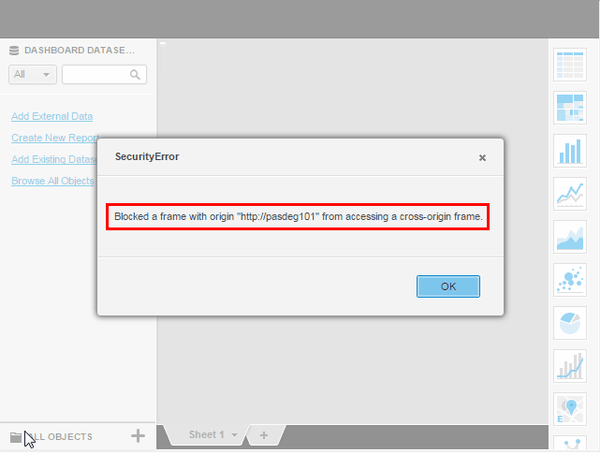
When opening a HTML page containing an iFrame pointing to a Strategy Visual Insight Dashboard, the following error is thrown:
ka04W000000OcipQAC_0EM440000002V5V.jpeg


"Blocked a frame with origin "WEBSERVER" from accessing a cross-origin frame."
 
 
CAUSE
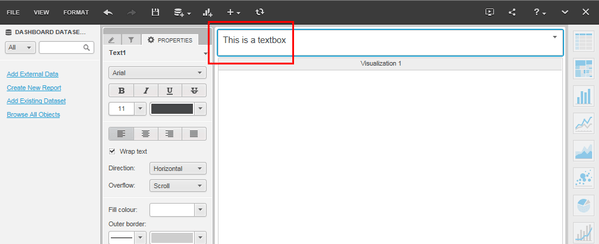
This issue is caused by a textbox object on the Visual Insight Dashboard. This is a known issue with Strategy web 10.1.
 
STEPS TO REPRODUCE
1. Create new Visual Insight Dashboard
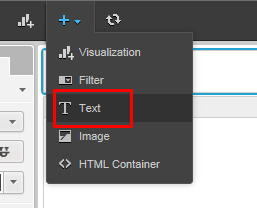
2. Insert textbox

ka04W000000OcipQAC_0EM440000002V5P.jpeg
ka04W000000OcipQAC_0EM440000002V5T.jpeg

3. Save Dashboard
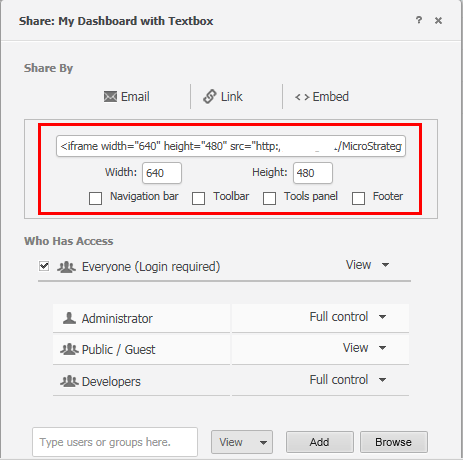
4. Share Dashboard and obtain iFrame HTML:
ka04W000000OcipQAC_0EM440000002V5R.jpeg

5. Create HTML page and insert iFrame HTML:
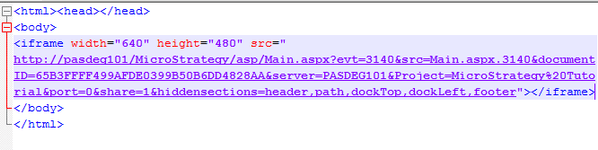
ka04W000000OcipQAC_0EM440000002V5d.jpeg

6. Run HTML page in a browser and observe error message

ka04W000000OcipQAC_0EM440000002V5V.jpeg

 
ACTION
This issue has been addressed with Strategy Web 10.2. Upgrade to take advantage of the fix.


Comment

0 comments

Details

Knowledge Article

Published:

July 12, 2017

Last Updated:

July 12, 2017