EducationSoftwareStrategy.com
StrategyCommunity

Knowledge Base

Product

Community

Knowledge Base

TopicsBrowse ArticlesDeveloper Zone

Product

Download SoftwareProduct DocumentationSecurity Hub

Education

Tutorial VideosSolution GalleryEducation courses

Community

GuidelinesGrandmastersEvents
x_social-icon_white.svglinkedin_social-icon_white.svg
Strategy logoCommunity

© Strategy Inc. All Rights Reserved.

LegalTerms of UsePrivacy Policy
  1. Home
  2. Topics

KB275887: The App falls into an infinite loop when Mobile server with HTTPS protocol is not connected with MicroStrategy Mobile for iPad/iPhone App 10.1


Community Admin

• Strategy


SYMPTOM: 
The App falls into an infinite loop when Mobile server with HTTPS protocol is not connected with Strategy Mobile for iPad/iPhone App 10.1.
 
STEPS TO REPRODUCE:
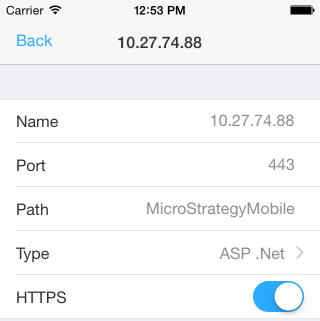
  • Launch Strategy Mobile for iPhone App.
  • Open Setting page, modify the mobile server, change the port to 443 and enable HTTPS protocol, as shown below:
ka04W000000OhS4QAK_0EM4400000029uL.jpeg
  • Remove the login credential for project, as shown below:
ka04W000000OhS4QAK_0EM4400000029uE.jpeg
  • Exit the App.
  • Reopen the App, an error "Could not connect Mobile Server" pops up, as shown below:
ka04W000000OhS4QAK_0EM4400000029uX.jpeg
  • Click "OK" and then the other error "Authorization required to proceed" pops up, as shown below:
ka04W000000OhS4QAK_0EM4400000029uJ.jpeg
  • Click "Login" and then it goes back to the step 5 again.  It falls into an infinite loop.  

 
CAUSE: 
This is a known issue with Strategy Mobile for iPad/iPhone App 10.1.
 
ACTION:
This is fixed in Strategy Mobile 10.3 application. Upgrade to this release to take advantage of the fix.


Comment

0 comments

Details

Knowledge Article

Published:

May 18, 2017

Last Updated:

May 18, 2017