EducationSoftwareStrategy.com
StrategyCommunity

Knowledge Base

Product

Community

Knowledge Base

TopicsBrowse ArticlesDeveloper Zone

Product

Download SoftwareProduct DocumentationSecurity Hub

Education

Tutorial VideosSolution GalleryEducation courses

Community

GuidelinesGrandmastersEvents
x_social-icon_white.svglinkedin_social-icon_white.svg
Strategy logoCommunity

© Strategy Inc. All Rights Reserved.

LegalTerms of UsePrivacy Policy
  1. Home
  2. Topics

KB275936: “QueryEngine encountered error: FetchScroll…[ODBC SQL Server Wire Protocol driver]String data, right truncated” occurs when executing a report with the datatype NVARCHAR(max) in MicroStrategy Developer 10.x


Stefan Zepeda

Salesforce Solutions Architect • Strategy


The issue described in this article is a limitation of the DataDirect ODBC SQL Server driver. This issue occurs in earlier versions of MicroStrategy with the DataDirect driver as well as the Native Client driver from MicroStrategy.

SUMMARY:
The issue described in this article is a limitation of the DataDirect ODBC SQL Server driver. This issue occurs in earlier versions of Strategy with the DataDirect driver as well as the Native Client driver from Strategy.
 
SYMPTOM:
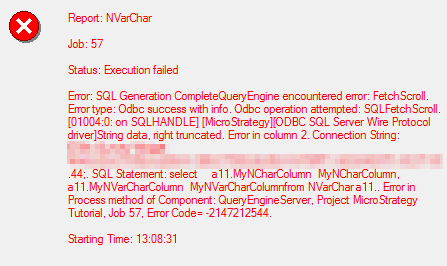
In Strategy 10.x, users are unable to run reports that contain attributes or metrics with the datatype NVarChar(max). The following error message occurs during report execution:
 

ka02R000000kbJcQAI_0EM440000002C3a.jpeg


Error: SQL Generation Complete
QueryEngine encountered error: FetchScroll.
Error type: Odbc success with info. Odbc operation attempted: SQLFetchScroll. [01004:0: on SQLHANDLE] [Strategy][ODBC SQL Server Wire Protocol driver]String data, right truncated
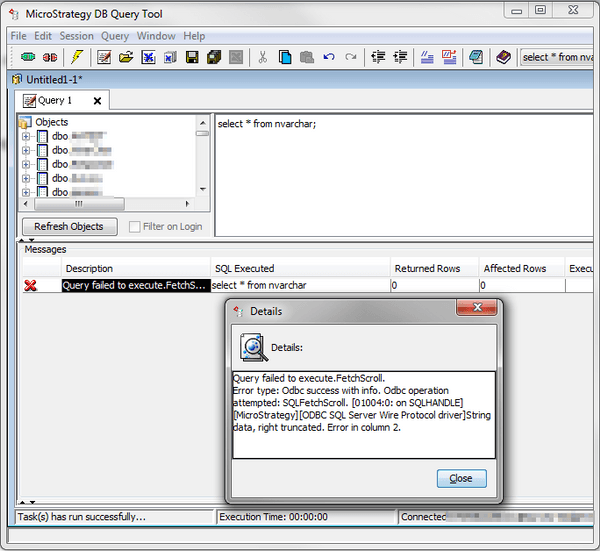
 
Note: If users attempt to query the table through DB Query Tool, the same error message displays.
 
STEPS TO REPRODUCE:

  • Create a table in SQL Server with the datatype NVarChar(Max)
  • Insert a value into that table that exceeds 4676 characters in length
  • Import the table into Warehouse Catalog and update schema
  • Create an attribute from this table and update schema
  • Create a report using this attribute, run the report
  • Notice the error message appears
  • Connect to this database in DB Query Tool
  • Run a Select * from table, notice the error message appears:
ka02R000000kbJcQAI_0EM440000002C3b.jpeg

 
CAUSE:
This issue is a limitation of the DataDirect ODBC SQL Server Wire Protocol driver. The driver has a character limit of 4676 characters in length, even though the column in the database can store up to 2GB.
 
ACTION:
CAST the column to a specified amount that does not exceed 4000 characters in length. The 4000 character limit is the specified limit for NVarChar. For example: ApplySimple("cast(#0 as NVarChar(4000))", MyNVarCharColumn).
 
Note: The syntax for the ApplySimple will vary depending on the database. The example above was written for a SQL Server database.


Comment

0 comments

Details

Knowledge Article

Published:

June 8, 2017

Last Updated:

July 17, 2017