SYMPTOM:
In Strategy Web, create ESRI map visualization in dashboard, the visualization does not display.
CAUSE:
A possible cause of the issue is a network problem. Third party software in network can shutdown the communication to ESRI.
You can use a network trace (such as fiddler) to verify the situation.
When the request to https://js.arcgis.com/4.23/ which is required by ESRI map visualization, it normally it redirects to https://js.arcgis.com/4.23/init.js and downloads this init.js file.
Under a problematic situation, when request to https://js.arcgis.com/4.23/ , an HTML web page returned and close the connection, as shown below:
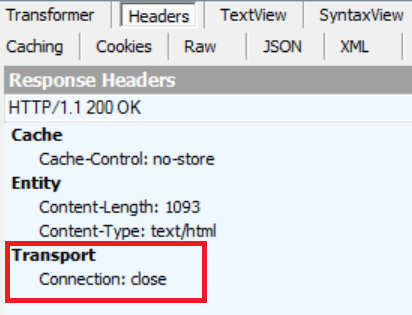
In a network trace of the behavior, you would see the "Transport" header in the Response contains
"Connection: close"
HTML page content may be similar to the below:
<html>
<head>
<script language="javascript">setTimeout("location.replace(location.href.split(\"#\")[0])",2000);</script>
<script type="text/javascript" src="http://<an internal IP>:89/cookie/flash.js"></script>
<script language="javascript">setTimeVal("1435290307725", "2130154372");setURL("<an internal IP>");supFlash();</script>
</head>
<body>
<object classid="clsid:d27cdb6e-ae6d-11cf-96b8-444553540000" codebase="http://fpdownload.macromedia.com/pub/shockwave/cabs/flash/swflash.cab#version=7,0,0,0" width="0" height="0" id="m" align="center"><param name="allowScriptAccess" value="always" />
<param name="movie" value="http://<an internal IP>:89/cookie/flashcookie.swf" />
<param name="quality" value="high" />
<param name="FlashVars" value="fc=15231429&f=2600472748" />
<embed src="http://<an internal IP>:89/cookie/flashcookie.swf"FlashVars="fc=15231429&f=2600472748" quality="high" width="0" height="0" name="m" align="center" allowScriptAccess="always" type="application/x-shockwave-flash"pluginspage="http://www.macromedia.com/go/getflashplayer" />
</object>
</body>
</html>
