EducationSoftwareStrategy.com
StrategyCommunity

Knowledge Base

Product

Community

Knowledge Base

TopicsBrowse ArticlesDeveloper Zone

Product

Download SoftwareProduct DocumentationSecurity Hub

Education

Tutorial VideosSolution GalleryEducation courses

Community

GuidelinesGrandmastersEvents
x_social-icon_white.svglinkedin_social-icon_white.svg
Strategy logoCommunity

© Strategy Inc. All Rights Reserved.

LegalTerms of UsePrivacy Policy
  1. Home
  2. Topics

KB276188: Some alters are missing in Alert configuration page in MicroStrategy Operation Manager 10.1


Community Admin

• Strategy


Some alters are missing in Alert configuration page in MicroStrategy Operation Manager 10.1

SYMPTOM:
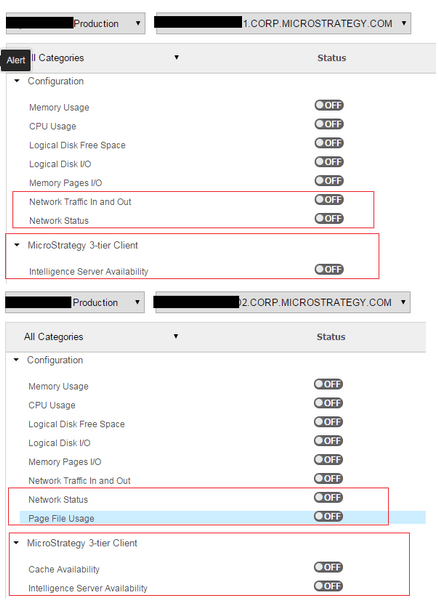
In Strategy Operation Manager 10.1, some alters are missing in Alert configuration page, as below picture shown:
ka04W000000ObOYQA0_0EM4400000029At.jpeg

CAUSE:
This issue is related with the configuration files in Health Agent machine.
ACTION:

  1. Go the machine which has some alerts missing and add one file named 'Config.xml' file under <Health Center location>/<machine-name>-GUI/ folder with the content below:
    
    <GUIConfig>
         <TestingBackdoor> 
             <SystemChecksTree>
                  <DisplayType>All</DisplayType>
             </SystemChecksTree> 
         </TestingBackdoor>
    </GUIConfig>

  2. Then restart Health Center services and Web server.

Comment

0 comments

Details

Knowledge Article

Published:

June 4, 2017

Last Updated:

June 4, 2017