SUMMARY:
This article discusses a known issue with Command manager handling special characters within addresses.
SYMPTOM:
In Strategy Command Manager 9.4.1., when using the ALTER ADDRESS procedure to rename an address for a user, the change does not take effect in Strategy Developer. This is seen specifically when certain special characters such as "+" are used within the Physical Address of the user.
STEPS TO REPRODUCE:
1. Log in to Strategy Developer with the Administrator user.
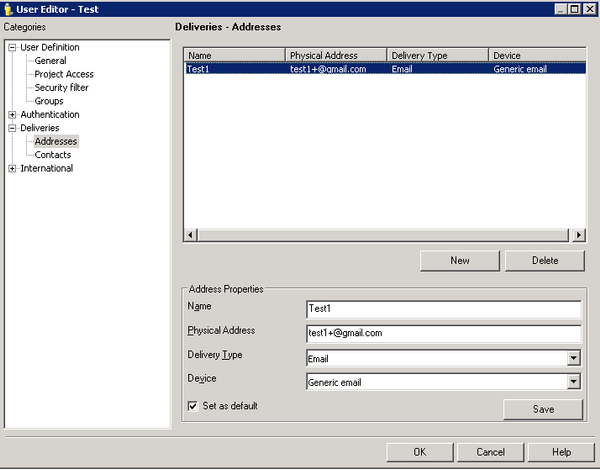
2. Create a “Test” user with a Delivery Address that has “Test1” for Name and “test1+@gmail.com” for the physical address. The Delivery Type and Device can be left to their default values. Click “OK” to save.
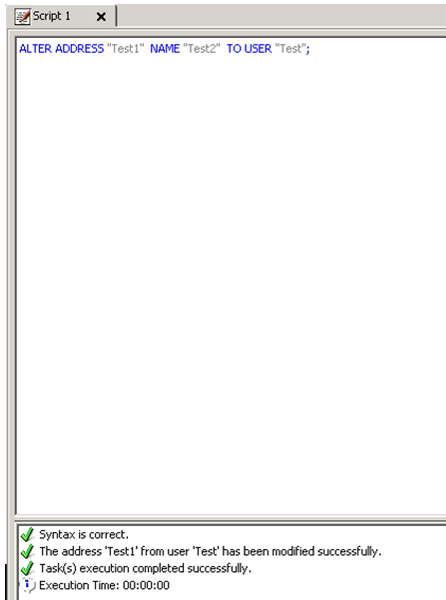
3. Sign in to Strategy Command Manager with the Administrator user, and execute the script “ALTER ADDRESS "Test1" NAME "Test2" TO USER "Test”. Notice that the task completes successfully in the Messages tab.
4. Log back in to Strategy Developer with the Administrator user, navigate to the user “Test” and check the users Delivery Addresses. Notice that the Delivery Address name was not changed.
CAUSE:
This is a known issue in Strategy Command Manager 9.4.1 when special characters are used in the Physical Address.
ACTION:
Currently this issue is still being reviewed for feasibility by our Technology team and it is not scoped for any upcoming scheduled Strategy release.
WORKAROUND:
Change the physical address for the user directly through User Manager in Strategy Developer 9.4.1.
The Strategy Internal Reference Number for the issue discussed in this technical note is DE26122.
