STEPS TO REPRODUCE:
1. Create a source document with Category selector targeting at a simple grid. Category selector should be check box which enables multi-selection.
2. Create a target document with element prompt on Category and a simple grid.
3. Add link A in source document like below:
http://10.27.72.81/MICROSTRATEGY/ASP/Main.aspx?evt=2048001&src=Main.aspx.2048001&documentID=6427F10348D4D5F99CC4D6BE6F35CB56&elementsPromptAnswers={&Category@GUID};{&CURRENTSELECTIONELEMENTID:W45&}
4. Add link B in source document like below:
http://10.27.72.81/MICROSTRATEGY/ASP/Main.aspx?evt=2048001&src=Main.aspx.2048001&documentID=6427F10348D4D5F99CC4D6BE6F35CB56&elementsPromptAnswers={&Category@GUID};{&CURRENTSELECTIONELEMENTID:W45&}^{[Category]@DESC}
5. Execute source document and choose 2 categories.
6. Refresh the document and click on A. ---See correct result returned.
7. Re-prompt target document.---See Category ID shows in selected tab.
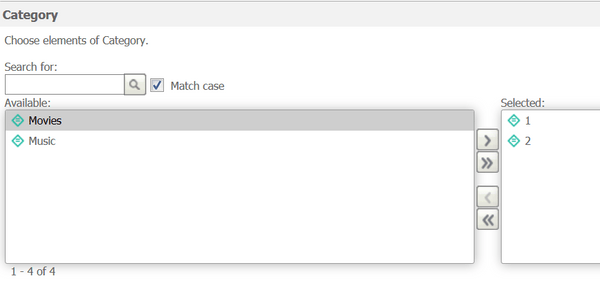
8. Click on B.------See correct result returned.
7. Re-prompt target document.---See the first selected Category shows DESC but the second one still displays ID in selected tab.

CAUSE:
This is a known issue of Strategy Web 10.2 and above.
ACTION:
Strategy has fixed this defect as of Q3 2017. All Strategy versions 10.2 and beyond will not encounter this issue.
* See similar issue on mobile:
KB272090: Prompt page triggered by the re-prompt URL API lists attribute ID form instead of DESC in the Selected tab on iPad against MicroStrategy 10.1 Mobile Hotfix 1
