EducationSoftwareStrategy.com
StrategyCommunity

Knowledge Base

Product

Community

Knowledge Base

TopicsBrowse ArticlesDeveloper Zone

Product

Download SoftwareProduct DocumentationSecurity Hub

Education

Tutorial VideosSolution GalleryEducation courses

Community

GuidelinesGrandmastersEvents
x_social-icon_white.svglinkedin_social-icon_white.svg
Strategy logoCommunity

© Strategy Inc. All Rights Reserved.

LegalTerms of UsePrivacy Policy
  1. Home
  2. Topics

KB280164: Summary on New behavior of Selector Element Count in MicroStrategy Web


Community Admin

• Strategy


Summary on New behavior of Selector Element Count in MicroStrategy Web 10

In Strategy Web 9.4, single-select selector like Radio Button shows "x of N" pattern, which will cause confusion when there is no selection, as in below screenshot:

ka04W000000Og2EQAS_0EM440000002V6j.jpeg
ka04W000000Og2EQAS_0EM440000002V6p.jpeg

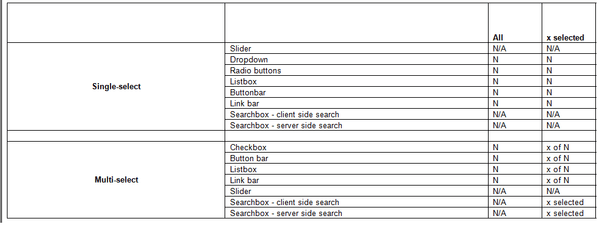
In Strategy Web 10, the Element Count spec has changed as below:
ka04W000000Og2EQAS_0EM440000002V6r.jpeg

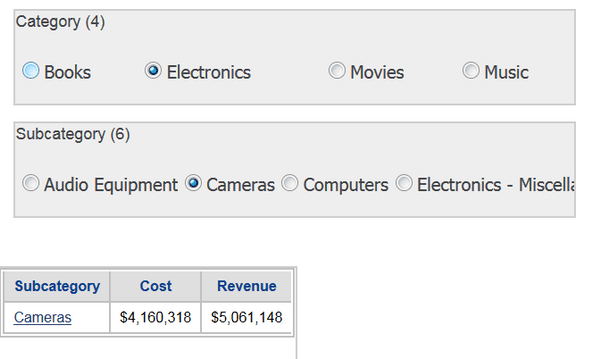
a. If the selector is "Single-select", there are only two situations: either "All" or "1" is selected. It does not make sense to show "1 of N". Thus we only show total number of elements (as "N") for both statuses. 
b. If the selector is "Multi-select", we show total number of elements (as "N") when "All" is selected; we show "x of N" when x elements are selected.
For example, Radio Button selector in Strategy Web 10 will show like below:
ka04W000000Og2EQAS_0EM440000002V6q.jpeg
ka04W000000Og2EQAS_0EM440000002V6s.jpeg


Comment

0 comments

Details

Knowledge Article

Published:

July 12, 2017

Last Updated:

July 12, 2017